Info
Find helpful information about Yodeck’s Partner Programs and answers to frequently asked questions.
Can I pay annually as a partner?
Right now, our Partner’s pricing model is monthly invoicing. But annual or multi-year prepayments are also an option, and additional discounts are offered!
What are the different types of Yodeck Partners?
Yodeck Affiliate
Affiliates direct sales to https://www.yodeck.com/ or may directly sign up customers on the Yodeck platform. After the customer has reached the Yodeck site or app, affiliates will not interact with the customer. Affiliates do not bill or provide any service to customers. They only bring in new signups to Yodeck. When a tracked user signs up for a subscription, all payments are considered when calculating the affiliation fees.
Yodeck Reseller
- Sell the Yodeck service directly to their customers and support them throughout the deployment and operation of the service.
- Sign up and bill their customers directly, while Flipnode LLC bills Resellers for the services provided at a discounted rate.
- They are expected to provide local purchasing and assembly of Yodeck Players. Although not mandatory, this allows for higher service discounts for resellers. They may provide Yodeck Players for free, as a lease, or offer them to customers for purchase. They may also provide additional equipment (TV sets, TV mounts, cables, network equipment, etc.) and installation services, directly or through a subcontractor, to provide a complete solution to their customers.
- They are required to provide Yodeck support services to their customers through their Partner Account. These must include remote support of Yodeck installations and may consist of on-site support services. Providing a wholly managed service over Yodeck is also an option, where the Partner manages the customer’s account, and the customer never has to deal with Yodeck directly.
Yodeck Whitelabel Partner
Whitelabel Partners are Resellers with their version of a Yodeck Portal. Users do not see Yodeck branding anywhere. Whitelabel Partners have the following benefits:
- Custom CSS, changing text or branding, even hiding whole sections of the Portal.
- Custom web address for the management Portal, e.g., https://app.yourcompany.com
- Customized SD Card image with custom branding for easy and safe SD card imaging.
Additionally, there is an annual fee for servicing a Whitelabel Partner Account.
Whitelabel Partners are free to use their own pricing policy with customers, while the published Yodeck Pricelist naturally binds Resellers that customers can see on Yodeck.com.
Find out moreHow long does it take to set up my partner site?
Our team will have your Partner’s site in less than 1-2 business days!
What do I need to qualify as a Yodeck Partner?
You need to be an IT or Digital Signage professional who provides Digital Signage solutions to other companies. That’s it.
Of course, there is a minimum billable volume for Resellers and another for Whitelabel Partners, but these are low. Any difference between actual volume and minimum billable volume is reimbursed as soon as you exceed this required volume, so you will not lose any money.
I want to use Yodeck for my own customers!
We are establishing the Yodeck Partner Network, which is comprised of IT and Digital Signage professionals worldwide who will use Yodeck as the technology to provide complete turn-key solutions to end customers. We have 3 levels of Partners:
- Affiliates: You bring in sales leads through ads/banners or direct contact, and you get a recurring affiliation fee, nothing more.
- Resellers: You resell Yodeck subscriptions at a discount while accessing a Partner Account on our backend to support your customers.
- Whitelabel Partners: You get everything a Reseller gets, plus your custom branding on our Portal, no mention of the Yodeck brand, and your own custom pricing.
Can I change from being a Reseller to a Whitelabel Partner?
Yodeck allows a Partner to easily switch from being a Reseller to operating as a Whitelabel Partner, and vice versa. Flipnode LLC will evaluate each switch request and proceed with a custom proposal for the switch.
Many Partners choose to start as Resellers and review our Partnership down the road to consider switching to Whitelabel. Others begin as Whitelabel from day one. We try to accommodate requests as they come in.
How do I support my customers?
If you are a reseller or a white-label partner, you will get access to a partner account. This particular account allows you to log in as any user of your customer Accounts. This way, you can log in and see exactly what your users see, making it easy for you to help them. Finally, our Yodeck Support Team is here for you. If you need help, you can escalate the issue to us, and we will assist you.
Can I use Yodeck for my customers without being a Reseller?
Short answer: Of course, but not on the Free Plan.
Here are the relevant quotes from our Terms of Service:
- One person or legal entity may not maintain or use more than one Free Account. You must use a single Account for all screens you manage through the service. Using multiple Free Accounts (which allow only one screen to be managed) to manage multiple screens is not allowed.
- Suppose you are using the service to serve your customers. In that case, you are obliged to inform Flipnode about the services you provide using the service and to whom you provide them, along with any other information Flipnode may request from you. You may be asked to sign a partnership agreement to continue your business as above.
- The Terms of Service apply in whole to (i) the Account Holder, (ii) users to whom the Account Holder has provided access to the account, and (iii) end-customers and end-users that may receive services through the service indirectly by a 3rd Party acting as a Reseller or Partner.
Essentially, what that means is that you are very welcome to provide Yodeck-based services to your customers, but they must be on a paid account, even if they only use 1 screen. To do that, there are two options:
- You (or your customer) should subscribe to the Monthly or Annual Plan for 1 (or more) screens using a credit card as if the customer were buying directly from us.
- You can contact us and get a Reseller Account (or Whitelabel) to resell the service to your customers. We will bill you (through an invoice), and you will bill your customers.
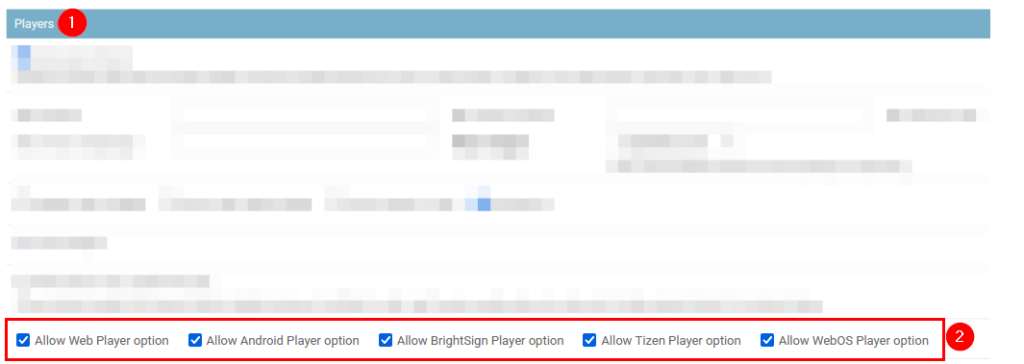
How can I enable my site’s Web, Brightsign, Android, Tizen, WebOS, and FireOS players?
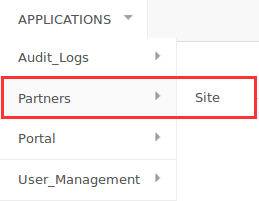
You can access your site’s settings and enable the relevant options in the Functionality section, as shown below.
Enable this option on your site to allow accounts to create these players if the relative option is enabled.

How do I create an Onboarding and a Layout Template account for my site?
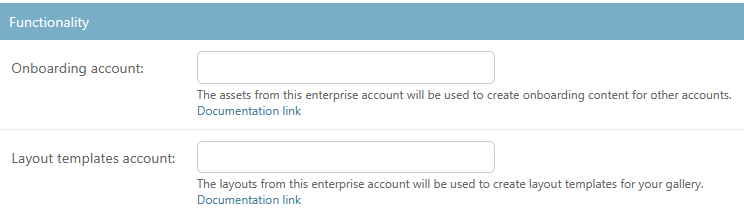
Your site can use two special accounts to give your customers ready-made content: an Onboarding account and a Layout Templates account. Each one does a different job. You create both under your site, set them up with a workspace that has an exact name and then link them in your site settings.
| Onboarding account | Layout Templates account | |
|---|---|---|
| What it provides | Starter content: media files and media folders | Layout templates, plus the apps you create in it |
| Workspace to use | __Default Workspace__ | __PUBLIC__ |
| Who gets it | Only customer accounts created after you add the content | All customer accounts under your site, existing and new |
| When | Once, at the moment the customer account is created | Every time a customer creates a new layout |
| Do your later changes reach customers? | Only accounts created after the change | Yes, templates update when you edit the originals |
| What the customer sees | The files in their Media section, as if they uploaded them, ready to reuse in playlists and layouts | Your layouts among the layout templates, each one a complete template to import and edit |
Set up the Onboarding account
Use the Onboarding account to pre-load every new customer account with starter content, for example your logo, sample images, videos or documents.
- Create a new user account under your site, with its own email address. Do not reuse the email address of an existing customer or partner user.
- Make sure the account is on the Enterprise plan.
- In the account, create a workspace named
__Default Workspace__. Type the name exactly as shown, with two underscores on each side. - Upload your starter content (media files and media folders) to the
__Default Workspace__workspace.
How it works: When someone creates a new customer account under your site, Yodeck copies the content of the __Default Workspace__ workspace into that account. The files appear in the customer’s Media section as if the customer had uploaded them, and the customer can reuse each file in playlists and layouts. The copy happens only once. Existing customer accounts do not receive the content, and anything you add later reaches only accounts created after that.
Set up the Layout Templates account
Use the Layout Templates account to offer your own layouts as templates. Your customers find them among the layout templates when they create a new layout, next to the default Yodeck templates.
- Create a new user account under your site, with its own email address. Do not reuse the email address of an existing customer or partner user.
- Make sure the account is on the Enterprise plan.
- In the account, create a workspace named
__PUBLIC__. Type the name exactly as shown, with two underscores on each side. - In the
__PUBLIC__workspace, create a layout and add the media and apps it needs. - Save the layout in the
__PUBLIC__workspace.
How it works: Every layout you save in the __PUBLIC__ workspace is available as a template to all customer accounts under your site, existing and new. When you edit an original layout, the template updates for everyone. Customers get each layout as one complete template that they can import and edit. They do not get the media files and apps inside it as separate items. Apps you create in this account are also available to all customer accounts under your site.
Link the accounts to your site
- Go to your site’s settings and open the Functionality section.
- Enter the email address of your Onboarding account in the Onboarding account field and the email address of your Layout Templates account in the Layout templates account field.
- Save your settings.