Table of Contents
Overview
ScreenFeed apps are now available in Yodeck’s App Gallery, making it easy to add premium content to your screens without managing separate tools or vendors. You can browse, purchase, configure, and assign ScreenFeed apps directly from within Yodeck.
This integration helps you keep your content fresh with ready-made apps for news, weather, social media, finance, calendars, flight information, and more. Whether you want one app for a few screens or broader access through the Everything Plan (Bundle), Yodeck keeps the setup and billing experience in one place.
What are ScreenFeed Apps in Yodeck?
ScreenFeed apps are premium third-party apps that you can access from Yodeck’s App Gallery. They help you display ready-made content on your screens, including news and headlines, weather and environmental information, financial data, calendars, social media posts, local and lifestyle content, travel and transportation content, and light engagement content, such as quizzes and inspirational messages.
ℹ️Instead of setting up separate services outside Yodeck, you can manage these apps inside the platform you already use for your digital signage.
Why use the ScreenFeed Apps?
ScreenFeed apps let you easily incorporate polished, dynamic content without creating it yourself. With the addition of ScreenFeed apps in our App Gallery, you can explore new and specialized content options to accomplish tasks that might not be possible with our standard apps. You might consider using them if you want to:
- Αvoid managing multiple vendors and billing relationships.
- Give different teams or locations more content options without adding complexity.
- Keep your screens fresh with frequently updated content while adding useful information to lobbies, waiting areas, break rooms, retail spaces, or public-facing displays.
Here are a few examples:
- A small café can use Weather Graphics and Local Favorites to make its screens feel more local and useful.
- A hotel lobby can use Flight Board, Weather Graphics, and Traffic Routes to help guests at a glance.
- A retail business can use The List, or Friendly News-in-Pictures, to keep screens lively and relevant.
Where can I find them?
You can find ScreenFeed apps in the App Gallery alongside native Yodeck apps.
You can:
- Browse available apps,
- Filter and search by the Partner Apps category,
- Open each app’s details page,
- Review pricing and app information,
- Purchase a subscription,
- Configure the app,
- Assign it to screens.
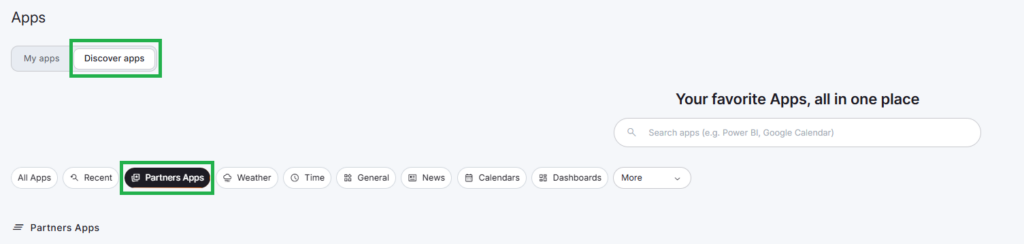
Distinct Filter for Quick Identification of ScreenFeed Apps
In the App Gallery, third-party ScreenFeed apps can be identified with the “Partner Apps” filter. This helps you quickly identify which apps Yodeck builds and which apps ScreenFeed provides.
ℹ️For ScreenFeed apps, Yodeck opens the configuration flow in a Yodeck-themed interface, while ScreenFeed handles the actual configuration on its side via iframe.
Available ScreenFeed Apps in Yodeck
Yodeck offers 29 ScreenFeed apps in total.
Who Can Purchase ScreenFeed Apps
Screenfeed apps can be purchased only by users within the “Billing Access” Group, i.e., the group that has the permission to manage the subscription details of the Yodeck Account
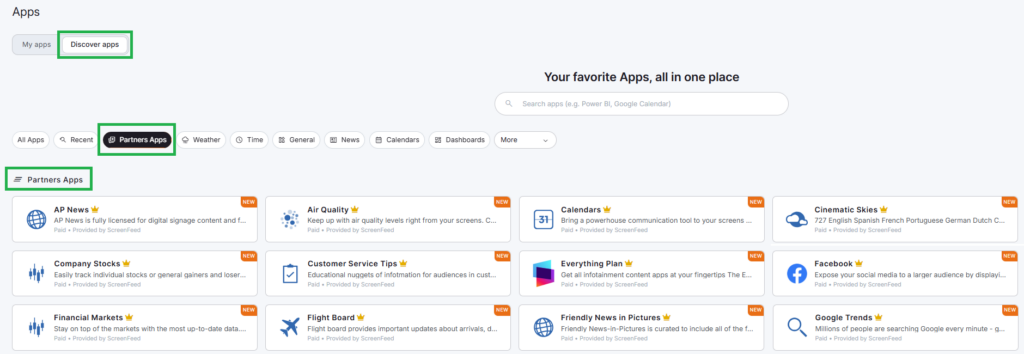
To make them easier to scan, we grouped them by use case (category) below.
ℹ️You can click on each App name to read the ScreenFeed documentation.
News and information
- Friendly News-in-Pictures: Audience-friendly news in a visual format
- AP News Graphics: Associated Press news content formatted for digital signage
- Reuters News Graphics: Reuters news content designed for signage displays
- The List: Ranked and trending entertainment-style content
- Window to Our World: Visual stories and images from around the world
Weather and environmental content
- Weather Graphics: Current weather conditions and forecasts
- Air Quality: Air quality information and forecasts
- Pollen Levels: Local pollen information
- UV Index: UV level and exposure information
- Weather Radar Map: Location-based weather radar visuals
- Cinematic Skies: Scenic sky and atmospheric content
Business and finance
- Financial Markets: Markets, currency, metals, crypto, and other financial updates
- Company Stocks: Stock data for selected companies
- Google Trends: Trending search topics and interest patterns
Social and communication
- LinkedIn: Posts from your LinkedIn business presence
- Instagram: Posts and media from your Instagram account
- Facebook: Facebook content for business or brand communication
- X (Former Twitter): Posts from X for live social content
- MS Teams: Posts from Teams channels for internal communication
Scheduling and workplace content
- Google Calendar: Google’s calendar-based content for schedules, events, and planning.
- Microsoft Calendar: Microsoft’s calendar-based content for schedules, events, and planning.
Lifestyle, wellness, and workplace culture
- Healthy Bites: Wellness-focused content and healthy living tips
- Inspirations: Inspirational quotes, messages, and interesting facts
- Safety Tips: Safety reminders for workplace or public screens
- Customer Service Tips: Customer service guidance and tips
- Local Favorites: Popular local venues and places of interest
Entertainment and engagement
- Pop Quiz: Trivia-style content for audience engagement
- Sports Central: Year-round coverage of desired teams from your favorite college or professional leagues.
Travel and transportation
- Flight Board: Arrivals or departures information for airports around the world
- Traffic Routes (North America): Route-based traffic conditions for North American use cases
Everything Plan of ScreenFeed Apps
We also offer a bundle called the Everything Plan for 29 ScreenFeed apps at a great price, making it easier to add more premium content to your Yodeck screens without purchasing apps one by one. If you want more flexibility across multiple screens, the Everything Plan lets you combine different content types under a single subscription and manage everything more easily.
ScreenFeed App Pricing in Yodeck
Yodeck uses per-screen pricing for ScreenFeed apps. You pay based on the number of licensed screens that will use the app. Consequently, we offer two main pricing options (with one app exception):
- Single app: All apps from the list of 29, except for “Flight Board” mentioned below, follow the same pricing analyzed below.
- “Flight Board“: This app, although it is part of the total 29 apps, has its own distinct pricing.
- Everything Plan (Bundle): This app bundle contains all apps with a distinct uniform pricing for everything.
Pricing by Screen Count
| Number of Licensed Screens | Monthly Price per Screen for a Single App | Monthly Price per Screen for a Flight Board | Monthly Price per Screen for the Everything Plan |
|---|---|---|---|
| 1–24 | $6.00 | $12.00 | $12.00 |
| 25–49 | $4.80 | $9.80 | $9.80 |
| 50–99 | $3.90 | $7.60 | $7.60 |
| 100+ | $3.30 | $6.50 | $6.50 |
Pricing Comparison
| Subscription Type | Best For | Starting Price |
|---|---|---|
| Single App | One specific content type on selected screens. (Remember the exception of the Flight Board* app.) | $6/screen/month * $12/screen/month |
| Everything Plan | Broader access to multiple premium content types. | $12/screen/month |
Pricing examples
The examples below demonstrate how per-screen pricing works in practice. Click on each arrow to expand and view it:
Example 1: One single app for 5 screens
You want to use Weather Graphics on 5 screens.
This setup falls in the 1–24 screen tier:
5 × $6 = $30/month
Example 2: Flight Board for 12 screens
You want to use Flight Board on 12 screens.
This setup falls in the 1–24 screen tier:
12 × $12 = $144/month
Example 3: Everything Plan for 30 screens
You want to use the Everything Plan across 30 screens.
This setup falls in the 25–49 screen tier:
30 × $9.80 = $294/month
Example 4: One single app for 75 screens
You want to roll out one ScreenFeed app across 75 screens.
This setup falls in the 50–99 screen tier:
75 × $3.90 = $292.50/month
ℹ️This kind of example shows how volume-based pricing can make larger rollouts more cost-effective.
How billing works
Yodeck keeps ScreenFeed app billing aligned with your main subscription, so you do not need to manage separate billing cycles.
- Per-screen licensing: Yodeck licenses ScreenFeed apps per screen and manages them at the account level.
- Prorated charges: If you purchase an app or change your number of licenses during your current billing cycle, Yodeck prorates the charge based on the days remaining in that cycle.
- Same billing date as your Yodeck subscription: Yodeck bills your marketplace subscriptions on the same date as your main Yodeck subscription.
- Immediate cancellation: If you cancel a ScreenFeed app subscription, Yodeck cancels it immediately and disables the app.
- Account balance credits: If you cancel a subscription or reduce your number of licenses, Yodeck calculates a prorated credit for the unused time and applies it to your account balance for future invoices.
ScreenFeed Apps During a Yodeck Subscription Cancellation
If you cancel a subscription, Yodeck disables the app(s) immediately. Make sure you plan changes carefully before you remove an app from an active screen setup.
Who can purchase ScreenFeed Apps?
ScreenFeed apps are available based on your Yodeck plan.
| Yodeck Plan | Can Browse Apps | Can Purchase Apps |
|---|---|---|
| Free | ✅ Yes | ❌ No |
| Basic Paid | ✅ Yes | ✅ Yes |
| Premium | ✅ Yes | ✅ Yes |
| Enterprise | ✅ Yes | ✅ Yes |
ℹ️If you use the Free plan, you can browse and preview apps, but you need to upgrade before you can purchase them.
Unavailable for reseller and white-label accounts
ScreenFeed apps are not available for reseller or white-label partner accounts. If your organization uses a reseller or white-label setup, you will be unable to view and purchase these third-party apps.
Licensing rules and limitations
Before you purchase ScreenFeed apps, keep the following rules in mind.
- You cannot subscribe to the same app twice, either as a single app subscription or as part of the Everything Plan.
- You may need to unassign screens before reducing licenses: If you want to reduce the number of app licenses, Yodeck may require you to unassign the app from enough screens and push those changes to your players. This process keeps your active assignments within your available license count.
- Changes to your main screen quota can affect app licenses: If you reduce your main Yodeck screen quota, Yodeck also reduces your app licenses automatically as needed so they never exceed your available screen count.
- Yodeck validates assignments when you push to screens: When you push content to screens, Yodeck checks whether your app assignments exceed your available licenses. If they do, Yodeck blocks the action and informs you until you resolve the issue.
💡As best practice, if you reduce licenses or screen quota, review your current assignments before you push changes. This will help you avoid validation errors and unexpected interruptions.
How the App setup works
After you purchase a ScreenFeed app, Yodeck typically guides you through this flow:
- Open the app from the App Gallery.
- Review the app Details, Legal Notice, and pricing.
- Choose how many screens you want to license.
- Complete the purchase.
- Configure the app’s settings in the Yodeck-themed ScreenFeed setup flow, depending on each app’s available settings (different settings are available to different ScreenFeed apps).
- Assign the app to your screens.
- Push the changes to your players.
ℹ️This flow helps you move from discovery to deployment without leaving Yodeck.
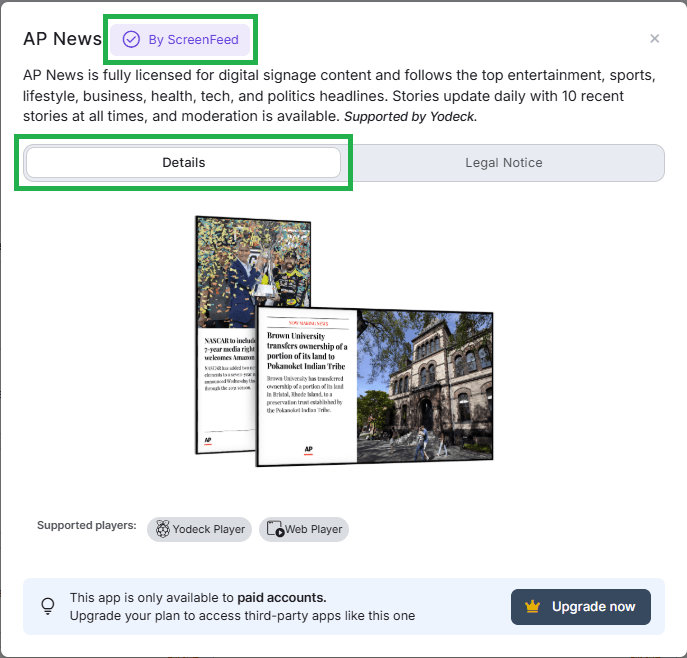
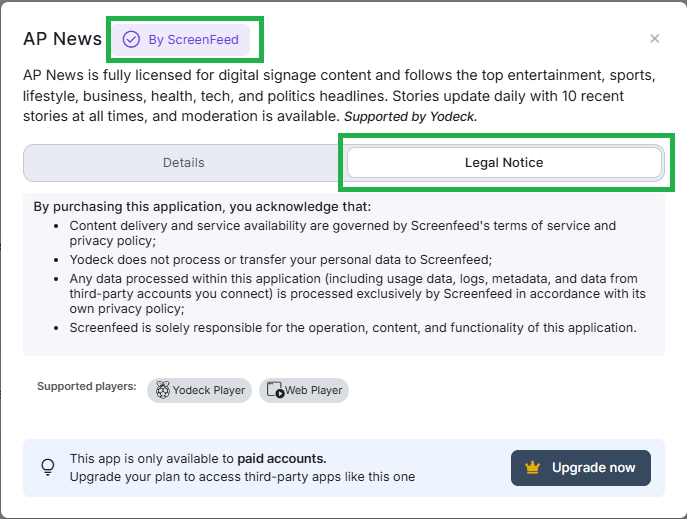
Should you choose a Single app or the Everything Plan?
The best choice depends on how many content types you want and how broadly you plan to deploy them.
| Single App Choice | Everything Plan Choice |
| A. Add one specific content type. | A. Use multiple content types across your screens. |
| B. Start with a small rollout. | B. Support different needs across teams or locations. |
| C. Test one use case first. | C. Add flexibility without buying many separate apps. |
| D. Keep your setup focused. | D. Scale your rollout over time. |
F.A.Q.s
Got questions? We’ve got answers! This section addresses common questions about the ScreenFeed Apps’ integration.
A single app gives you access to one specific ScreenFeed app. The Everything Plan (bundle) gives you access to 29 included ScreenFeed apps under one subscription model, licensed per screen.
Yes. Flight Board is included in the Everything Plan (bundle).
Yes. Yodeck offers 29 ScreenFeed apps in total, and the Everything Plan (bundle) includes all 29.
You can browse and preview them on the Free plan, but you need Basic, Premium, or Enterprise to purchase them.
Yes. Native apps show a “Yodeck” label, while ScreenFeed apps show a “ScreenFeed” label in the App Gallery.
No. Yodeck syncs marketplace subscriptions with your main Yodeck subscription billing cycle.
Yodeck cancels it immediately, disables the app, and applies any unused time as a prorated credit to your account balance.
Usually yes, but if the app is still assigned to more screens than your new license count allows, you must first unassign it from enough screens and push those changes.
No, not at all.
Yes. Yodeck opens the configuration flow inside the platform, although ScreenFeed handles the configuration experience technically via iframe.
Need Help?
The Yodeck Support Team can help you out! Log in to your Yodeck account and send us a message from the bottom right corner!