Skip to content
yodeck digital signage
  • FAQ
  • Support Center
  • Contact
  • Home
  • Getting Started
    • Portal Overview
      • Overview of the Yodeck Portal
      • Pushing Changes to Screens
      • Help Icons
    • Creating a Yodeck Player
      • Creating a Yodeck Player - Introduction
      • Creating a Yodeck Player based on Raspberry Pi 4
        • Downloading and using Etcher
        • Yodeck Raspberry Pi Compatibility Chart
        • Creating a Yodeck Player based on Raspberry Pi 4 - Introduction
        • Raspberry Pi Comparison
        • What is the Yodeck Player?
        • Notes for the RPi 4
        • Connect the Yodeck Player to a WiFi using your mobile phone by scanning a QR code
      • Creating a Yodeck Player based on Raspberry Pi 5
        • Creating a Yodeck Player based on Raspberry Pi 5 - Introduction
        • Raspberry Pi 5 Limitations
      • Creating a Yodeck Player based on Chrome browser
        • Setting up a Yodeck Web Player
        • Comparison Table RPi vs Web player
        • Web Player Chrome Extension and PWA
      • Create a Yodeck Android Player
        • Create a Yodeck Android Player - Introduction
        • Setting up an Android player with the Yodeck Software (via APK)
          • Setting up an Android player with the Yodeck Software (via APK--Android 7 or earlier)
          • Install Yodeck in Android with Setup Helper
        • Creating a Yodeck player based on Android
          • Setting up an Android player with the Yodeck Software (from Play Store)
          • Tested and Approved Android Devices
          • Android Limitations
      • Create a Yodeck Amazon Player
        • Create a Yodeck Amazon Player - Introduction
        • Setting up a Yodeck Amazon FireOS Player
        • Creating a Yodeck Player based on Amazon FireOS TV/Stick
          • Setting up a Yodeck Amazon Signage Stick Player
          • Amazon FireOS Limitations
      • Creating a Yodeck Player based on Brightsign
        • Setting up a Brightsign player with the Yodeck Software
        • Comparison Table RPi vs Brightsign player
        • Supported Brightsign Players
      • Creating a Yodeck Player based on Tizen
        • Samsung SSSP / Tizen Supported Devices
        • Setting up a Tizen player with the Yodeck Software
        • Tizen Limitations
        • Update the firmware version on your Samsung Tizen TV
      • Creating a Yodeck Player based on webOS
        • Setting up an LG webOS player with the Yodeck Software
        • LG webOS Supported Devices
        • LG webOS Limitations
      • Creating a Yodeck Player based on Windows
        • Setting up a Windows player with the Yodeck Software
        • Windows Supported Devices
        • How to uninstall the Windows application
      • Creating a Yodeck Player based on ChromeOS
        • Setting up a Yodeck ChromeOS Player
        • ChromeOS Limitations
    • Getting Started FAQs
    • Logging into the Yodeck Portal and creating an account
  • Navigating the Platform
    • Main Menu Overview
    • Dashboard Overview
    • The Dashboard
  • Media & Apps Management
    • Media Overview
      • Supported File Extensions
    • Media Library
      • Audio Assets
      • Documents
      • Scheduled Availability
      • Images
        • Gallery
        • Images Introduction
      • Videos
        • How to create a simple Video-wall with Yodeck
        • How to setup an HDMI video feed input or connect a USB camera (Video Input)
        • Recommended USB devices
        • Videos Introduction
      • Web Pages
        • Web Pages Introduction
        • Web Scripting Engine & Webpage Recording Tool
          • Hide Cookie Banner - Script Automation (BETA) 
          • Webpage Recording Tool
          • Web Scripting Engine
            • Scripting Engine Reference
            • Scripting FAQ
            • Scripting Templates
            • Tutorial - Google Analytics
            • Tutorial - How to remove the cookie pop-up from your web page media
            • Useful Scripts To Use
            • Mask your credentials at the Scripting Engine text field
    • Media Management FAQs
    • Apps
      • Apps Introduction
      • Available Apps!
      • App Compatibility Table
      • Weather Apps
        • Current Weather
        • Daily Weather
        • Hourly Weather
        • Weather Radar
        • Weather Wall
      • Time Apps
        • Analog Clock
        • Counter Down
        • Counter Up
        • Date & Time
        • Word Clock
        • World Clock
      • General Apps
        • Ticker
        • Google Slides
        • DSMenu
        • TV Source
        • Teams Celebrations
        • Google Sheets
        • WiFi Share
        • Embed
        • Player Basic Info
        • Google Traffic
        • Birthday Notification
        • PosterMyWall
        • WikiQuotes
        • QR Code
        • Online Slideshow
        • Rich Text
        • Interactive Kiosk
          • Custom Keyboard Guide for Interactivity
          • Interactive Kiosk - Introduction
      • News Apps
        • Al-Jazeera RSS
        • Bloomberg News
        • BBC RSS
        • CBC RSS
        • CNN RSS
        • CTV News
        • ESPN RSS
        • Fox News
        • Google Alerts
        • Google News RSS
        • NU.nl News RSS
        • SharePoint News
        • Sky News RSS
        • The Guardian RSS
        • The New York Times
        • The Wall Street Journal
        • Yahoo
        • Custom RSS
      • Social Apps
        • Facebook
        • Instagram
        • LinkedIn
        • Twitter
        • Taggbox Display
        • Microsoft Teams Town Hall
        • Walls.io
      • Calendar Apps
        • Calendar Apps Introduction
        • Google Calendar
        • Outlook Calendar
        • Daily/Weekly Calendar
        • Monthly Calendar
        • Calendar Events Feed
      • Dashboard Apps
        • Google Looker Studio
        • SmartSheet
        • Airtable
        • Tableau JWT
        • Cyfe
        • My Dashboard
        • Asana
        • Tableau
        • Google Analytics
        • Xero
        • Fathom
        • Shedul
        • Trello
        • Power BI
        • Zoho
        • Baremetrics
        • Putler
        • ChartMogul
        • Chargebee
        • Zenkit
        • Grafana
        • Monday.com
        • Jira
        • Power BI with Service Principal
          • Power BI with Service Principal - Identity Requirements
          • Power BI with Service Principal - Introduction
      • Business Tool Apps
        • Canva
        • Notion
        • Qube
        • Planner App
        • SharePoint
        • Teams Channels
        • Microsoft Teams Rooms
        • Viva Engage
        • Zoom Rooms
      • Interactivity Apps
        • Interactive Kiosk
        • Interactive Library
      • Custom Apps
      • Custom App Developer Guide
        • Static Apps
        • Custom Apps Introduction
        • UI Form Definition for Custom Apps
        • Building a Web App
        • App Codes & Examples
          • Display Public IP (sample App)
          • The Simple Clock
          • Shedul (sample App)
          • Trello (sample app)
          • Current Weather
          • Digital Clock (sample App)
          • Monthly Calendar
          • Calendar Events Feed
          • Date&Time App Code
          • Daily Weather App Source Code
          • ChartMogul (sample app)
          • Sample Web Widgets
          • Sample HTML Widgets
          • Tutorial - Your 1st Widget
          • Baremetric (sample app)
          • Hourly Weather App Source Code
          • Google Calendar (Sample App)
          • Count Down/Up
          • Rich Text (Sample App)
          • RSS Custom
        • Building an HTML App
          • Analog Clock (sample App)
          • 4. Adding Transparency (Optional)
          • 3. Making the Clock Efficient
          • HTML App API
          • HTML App Packaging
          • Player HTTP API
          • 2. Add Options to the Clock App
          • 5. Zipping and Uploading the Custom Sample Clock
      • Add-ons
        • Yodeck Assurance
        • Embeddable Feeds - Add-on
          • Embeddable Feeds
          • Counting Embeddable Feeds' Views
    • Apps Management FAQs
    • Media Availability
  • Content Management & Scheduling
    • Playlists
      • Playlists Introduction
      • Managing Playlists with Folder View ON
      • Interactive Playlist
      • Playlist of Layouts
      • Tag-Based Playlist [Premium & Enterprise Plans only]
      • Sub-Playlists [Premium & Enterprise Plans only]
      • Import CSV [Premium & Enterprise Plans only]
      • OneDrive Playlist
      • Dropbox Playlist
        • Dropbox Playlist Introduction
        • Dropbox - OneDrive - SharePoint - Google Drive - Google Photos Supported Media Formats
      • Playlists' FAQs
    • Layouts
      • Getting Started with the Yodeck Layout Editor
      • Editing and Customizing Content in the Layout Editor
      • Working with Screen Sizes and Aspect Ratios in the Layout Editor
      • Locking Elements and Controlling Access in the Layout Editor
      • Advanced Settings and Scheduling Layouts in the Layout Editor
      • Branded Templates: Create and Manage Reusable Layout Designs
      • Layouts' FAQs
    • Schedules
      • Schedules Introduction
      • Examples of Schedules
      • Turned Off option - How to Turn your TV On and Off
      • Schedules' FAQs
  • Screen & Device Management
    • Screens Overview
      • Basic Info
      • Location
      • Media Filtering
      • Screen Takeover
      • Screens Overview Introduction
      • Screens Table Manual
      • Status
      • Working Hours
    • Adding & Managing Screens
      • Screen Email Notifications
      • Sound/Display
        • Sound/Display Introduction
        • Support for LED board screens and billboards
      • Network
        • Network Introduction
        • Proxy
        • Static IPs
        • Keeping Your Players on Time by Configuring an NTP Server
        • Wireless
          • Configuring your player's WiFi network by editing the SETTINGS.TXT file
          • Configuring your WiFi network using an Ethernet cable
          • Quickly connect your Yodeck player to your WiFi network by using the WiFi wizard
          • Wireless Introduction
        • 3G/4G/LTE
          • Advanced Configuration for 3G / 4G / LTE modems
          • 3G/4G/LTE Introduction
    • Assigning Content to Screens
      • How to quickly assign content to your Screens
    • Monitoring Screen Status
    • Advanced Screen Options
      • Advanced Screen Options Introduction
      • On-screen Messages
      • Timed Events
      • Customization
        • Custom arguments/policies for Chromium
        • Customization Introduction
        • How to add custom proxy settings per Web Page using the Advanced Player Directives
      • Security
        • Security Introduction
        • Custom Certificates
        • Encrypt Player Storage [Enterprise Plan only]
        • Lock Down Player [Enterprise Plan only]
    • Interactivity
      • Interactivity Introduction
      • GPIO-Triggered Signage with Yodeck
        • GPIO Demo App: ON/OFF Trigger Example
        • GPIO HTTP API
        • GPIO Technical Documentation
        • Introduction to GPIO-Triggered Signage with Yodeck
    • Screen FAQs
  • User & Account Settings
    • Users & Groups
      • Users
      • Custom Roles
      • Groups
    • Account Settings
      • Account settings Introduction
      • Playback Reports
      • Volume Schedules
      • Security Policies
      • Audit Log
      • Custom Fonts
      • Players Boot Logo
      • Emergency Alerts
        • Default Emergency Alert Types
        • Common Alerting Protocol (CAP) Integration
        • National Weather Service Alerts
        • Emergency Alerts Introduction
      • Single Sign-on (SAML 2.0)
        • How to configure SSO with Salesforce
        • Introduction to Single Sign-on (SAML 2.0)
        • How to configure SSO with ADFS
        • How to configure SSO with Azure Active Directory (Microsoft Entra)
        • How to configure SSO with G Suite
        • How to configure SSO with OneLogin
          • How to configure SCIM with OneLogin
        • How to configure SSO with Okta
          • How to configure SCIM with OKTA
        • How to configure SSO with Azure Active Directory (Microsoft EntraID)
          • How to configure SCIM with Azure directory (EntraID)
    • Workspaces
      • Workspace Hierarchies
      • Workspaces Introduction
    • User & Account FAQs
    • My User Profile
    • Subscriptions & Billing
  • Help & Troubleshooting
    • Help Menu Overview
    • Troubleshooting
      • Issues with Logging into Yodeck Portal
      • Step-by-Step Troubleshooting Guide
    • Help & Troubleshooting FAQs
      • Tech FAQs
      • General FAQs
  • Best Practices
    • Best Practices Overview
    • Coming Soon!
  • Partner Portal
    • Partner Administrative Console
      • Introduction to Partner Administrative Console
      • Invoices
      • Recent Actions - Support/Download Links - Contact Us
      • Staff Permission Roles
      • Quick Links
        • Order Form for Partners
        • Quick links - Introduction
      • Applications
        • 2.5 My Users
        • Applications Introduction
        • 2.2 Site Settings
        • 2.3 Accounts
        • 2.4 Devices
        • 2.1 Audit Logs
      • Creating Whitelabel Playlists
        • Create a Whitelabel OneDrive playlist
          • How to configure the OneDrive Playlist to your client's account
          • Introduction to Creating a Whitelabel OneDrive playlist
        • Create a Whitelabel Dropbox playlist
          • How to configure the Dropbox Playlist to your client's account
          • Introduction to Creating a Whitelabel Dropbox playlist
        • Create a Whitelabel Google Drive playlist
          • How to configure the Google Drive Playlist to your client's account
          • Introduction to Creating a Whitelabel Google Drive playlist
    • Partner Portal FAQs
    • Introduction to Yodeck Partner Manual

HOME Documentations Security Policies

Security Policies

Last updated on September 28th, 2020

Table of Contents

  • Password
  • Session Policies
  • IP Address Whitelist
  • Social Login

In this section, we provide an optional feature at the Account level that will force users to change their passwords and also specify the password length, characters, etc.

info

Available only on the Enterprise plan!

This feature is only available on the “Enterprise” Plan. You might not see some menus below if you are not on the “Enterprise” Plan.
Remember that the “Enterprise” Plan is free if you only manage one screen to evaluate these features quickly.


Password

These options provide the following fields in the Account:

  • Disable Email Password Reset: By default, Yodeck allows Users to reset their password using their email. If you want to disable this capability for all Users in your Yodeck Account, you can enable this option.
  • Enforce Password Change Every: This drop-down menu allows you to optionally force Users to change their Password every 1, 3, 6, or 12 months.
  • Enforce Two Factor Authentication: The default is set to disable. By enabling this option, you enable the enforced two-factor authentication feature for your users’ accounts.
  • Enforce Password Reset on Users’ First Login: The default is disabled. This option enables the enforced password policy feature for your users’ passwords on the first login.
  • Enforce Policy for Screen Passwords: The default is set to disable. This option enables the enforced password policy feature for your players’ remote support passwords.
  • Password Policy Templates: It provides several ready-to-use templates. If you select one of the options, a predefined password policy check is used for the “Regular Expression Check” and “Policy Text Warning” fields described below.
  • Regular Expression Check: If you want, you can create your pattern (regular expression) for checking the password characteristics. Here are links with more information and samples: Link 1 and Link 2.
  • Policy Text Warning: Depending on the password pattern you used above, you need to enter a text warning in this field to inform Users of the password policy rules (e.g., “Password must be at least 8 characters long” ).

Session Policies

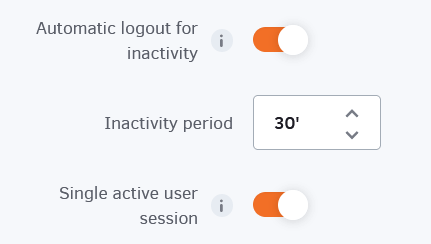
Define after how much time of inactivity you want your users to be automatically logged out of the account.

Restrict users to a single active session at a time; only the most recent login session will remain active.

IP Address Whitelist

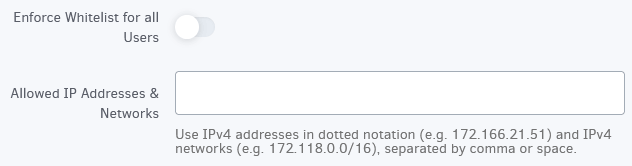
You can restrict Users from accessing your Account’s Dashboard from IP Addresses in the Whitelist you specify below. You can extend the Whitelist individually for each user through the User Management section. Note that Players are not affected by this restriction.
IP Address Whitelist

Social Login

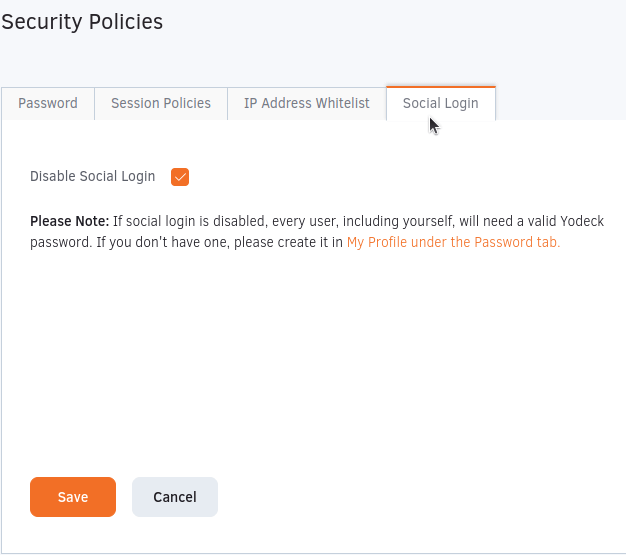
You can disable the option to log in to the Yodeck portal using a social account like Google. This configuration setting applies on all the users of the account.
Yodeck Social Login Security Setting

  • Homepage
  • General
    • What is Digital Signage
    • Free Signage Software
    • Raspberry Pi Signage
  • Product
    • Features
    • Apps
    • Free Signage Templates
    • Solutions
  • Support
    • Contact
    • Support Center
    • Give Feedback
    • FAQ

Copyright © 2015-2025 Flipnode LLC | All rights reserved.