Table of Contents
Overview
If you want to stop your Yodeck subscription, remove all paid licenses, or completely delete your account, this article explains exactly how it works and what to expect at each step.Most confusion comes from the difference between canceling a subscription and deleting an account. These are two separate actions in Yodeck, by design.
Managing Your Subscription and Screen Licenses
Yodeck subscriptions are based on the number of active screen licenses in your account.
Why does the system not allow zero (0) licenses?
Every Yodeck account must always have at least one screen. Because of this, it is not possible to reduce the number of screens to 0. This is expected behavior and does not mean your subscription is still active.
How to cancel all paid screen licenses?
To cancel your subscription and all paid screen licenses, do the following:
- Go to your subscription settings by navigating to the Profile icon > Account settings > Account Subscription > Reduce Licenses option.
- On the following page, reduce the number of screens (licenses) to 1.
- The change is displayed right next to the number of screens, for reference.
- Confirm the change by clicking the Next button, highlighted in green.
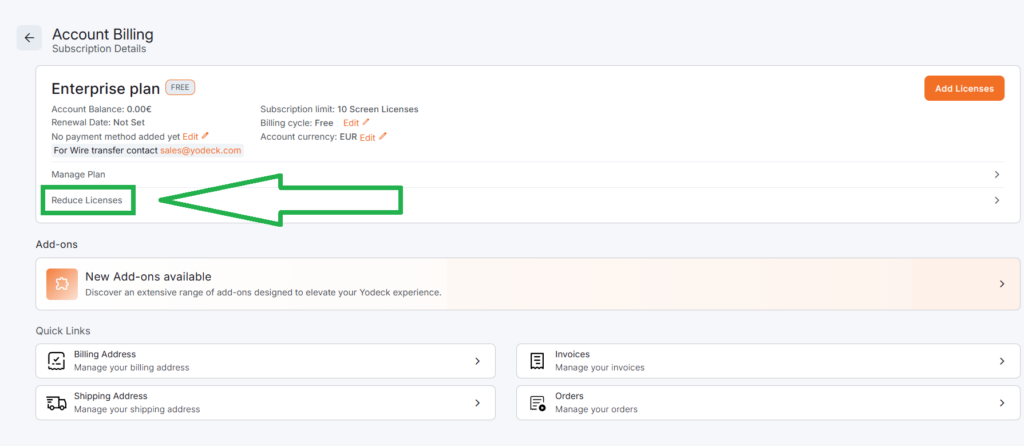
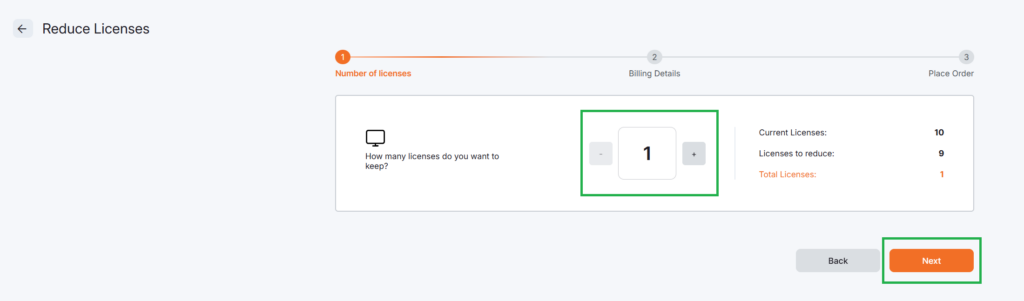
ℹ️This action:
- Cancels all paid licenses.
- Stops any future renewals.
- Downgrades your account to the Free plan automatically.
➡️More detailed instructions are available here:
https://www.yodeck.com/docs/user-manual/how-can-i-cancel-my-yodeck-subscription/
➡️For billing details and subscription logic, see:
https://www.yodeck.com/docs/user-manual/subscriptions-and-billing/
What “1 screen” actually means
When your account is reduced to 1 screen:
– You are not subscribed to a paid plan.
– You are not charged.
– Your account is on Yodeck’s Free plan.
– The 1 screen is available forever, at no cost.
Keeping 1 screen is not optional and does not represent an active subscription.
Canceling the Subscription vs Deleting the Account
⚠️Please note that canceling your subscription does not delete your account automatically.
| This is intentional, so you: | After cancellation: |
| Do not lose data by mistake. | Your account remains accessible. |
| Can return later without rebuilding everything. | No renewals or charges can occur. |
| Have clear proof that billing has stopped. | You are free to keep or delete the account. |
How to Permanently Delete Your Yodeck Account
If you do not want any account, screens, or stored data, you can request account deletion.
Important notes before deleting your account
– You must first downgrade to a 1-screen license.
– Account deletion is permanent.
– Deleted accounts cannot be recovered.
Requesting account deletion
- Submit your Account Deletion Request by first clicking the button below:
2. Then, on the following page, click the “Request full account deletion” button:
ℹ️Once the request is processed:
- Your account and data are permanently removed
- No subscriptions or renewals can exist
- No future charges are possible
F.A.Q.s
Got questions? We’ve got answers! This section addresses common questions about the Subscription Cancellation and Account Deletion.
Yodeck does not allow 0 screens. Reducing your account to 1 screen cancels all paid licenses and stops all renewals. This is the correct and complete way to cancel your subscription.
No. An account with 1 screen is on the Free plan. There is no active subscription and no billing.
No. Once you downgrade to 1 screen, future charges stop permanently unless you manually upgrade again.
Yes. Downgrading to 1 screen cancels all paid licenses and prevents renewals. You may then request account deletion if you want full data removal.
As previously mentioned, after downgrading to 1 screen, submit an account deletion request here:
https://app.yodeck.com/index.html#main/accountcompliance
No. You can cancel your subscription directly from your account by reducing your licenses to 1. Support is only needed if you encounter an error.
Need Help?
The Yodeck Support Team can help you out! Log in to your Yodeck account and send us a message from the bottom right corner!