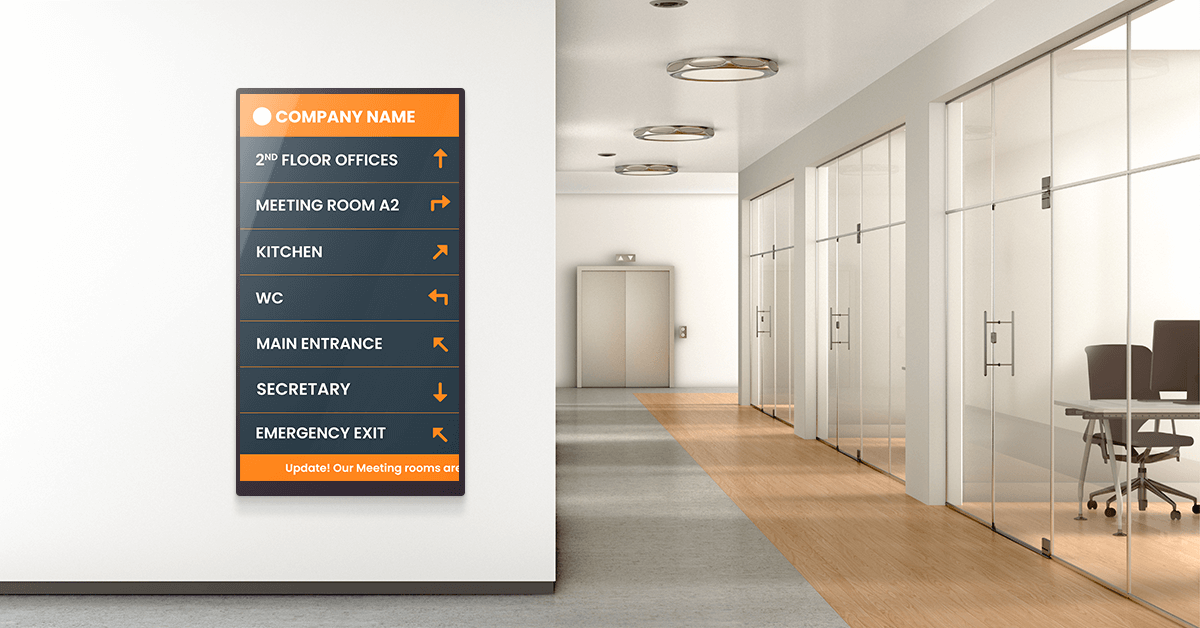
Replace outdated lobby boards with a digital building directory that updates in seconds and actually helps visitors find their way.
Key Takeaways
Every multi-tenant building has the same problem: visitors walk in, scan a wall-mounted board for the name they need, and hope the information is still accurate. Too often, it isn’t. Tenants move floors, new businesses replace old ones, and the printed directory stays frozen in time until someone orders a reprint.
A digital building directory solves this by putting a screen where that board used to be, connected to software that lets you update listings, maps, and announcements from any browser. No reprints, no service calls, no waiting.
In this guide, we’ll cover what digital building directories are, where they’re used, how to choose between software platforms and kiosk hardware, and how to set one up step by step.
What Is a digital building directory?
A digital building directory is a screen-based display that shows tenant listings, floor maps, room locations, and other building information in a format that can be updated remotely and in real time. It replaces traditional static boards, printed directories, and letter boards typically found in lobbies, hallways, and building entrances.
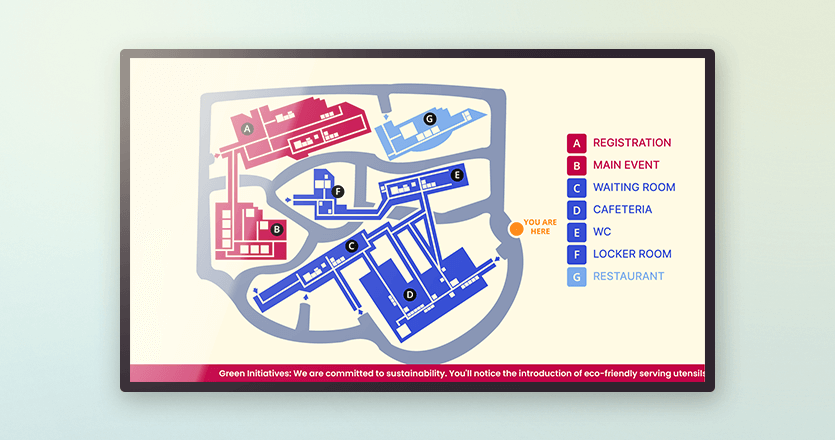
These digital directory signs run on digital signage software connected to a display, either a standard commercial screen or an interactive touchscreen kiosk. Building managers update content through a web-based dashboard rather than physically swapping out printed materials.
The result is a directory that stays accurate without maintenance visits, handles tenant changes instantly, and can display more than just a list of names.
You’ll find building directory digital signage in office towers, hospitals, universities, shopping malls, hotels, government buildings, and anywhere else visitors need to navigate a complex space.
Why switch from a static directory to a digital one?
Static directories do one thing: display a fixed list. The moment that list changes, you’re dealing with reprints, labor costs, and a window where visitors are looking at wrong information. Digital directory signage eliminates that lag.
Beyond accuracy, digital building directory signs open up capabilities that static boards simply can’t match. You can display wayfinding maps, rotate promotional content, push emergency alerts to every screen instantly, and support multiple languages without printing separate versions. For multi-tenant buildings, that flexibility matters. Tenant turnover, seasonal events, and evolving compliance requirements all demand a directory that can keep pace.
| See how digital signage is used for emergency situations.
| Static Directory | Digital Building Directory | |
|---|---|---|
| Update speed | Days to weeks (reprint/reorder) | Instant, from any browser |
| Cost per change | Printing + labor each time | Included in software subscription |
| Branding flexibility | Limited to printed format | Custom layouts, colors, logos, video |
| Emergency alerts | Not possible | Push alerts to all screens instantly |
| Multi-language support | Separate printed versions | Toggle or rotate on one screen |
| ADA accessibility | Fixed text size and contrast | Adjustable display, touchscreen search, audio |
| Additional content | Names and room numbers only | Maps, events, promotions, live data |
Where digital building directories work best
Digital building directories aren’t limited to corporate lobbies. Any space where people need to find their way through a multi-room or multi-tenant environment is a candidate.
1. Office buildings and corporate campuses
A digital office building directory is often the first thing visitors see when they walk in. In multi-tenant buildings, it displays company names, suite numbers, and floor assignments. In single-tenant corporate campuses, it helps visitors and new employees locate departments, meeting rooms, and amenities across multiple buildings. ✔ Office digital signage improves workplace navigation.
2. Healthcare facilities
Hospitals and large clinic networks are stressful environments to navigate. A digital lobby directory at the entrance helps patients and visitors find departments, specialty offices, and services without having to stop and ask. ✔ Healthcare digital signage helps hospitals improve patient wayfinding.
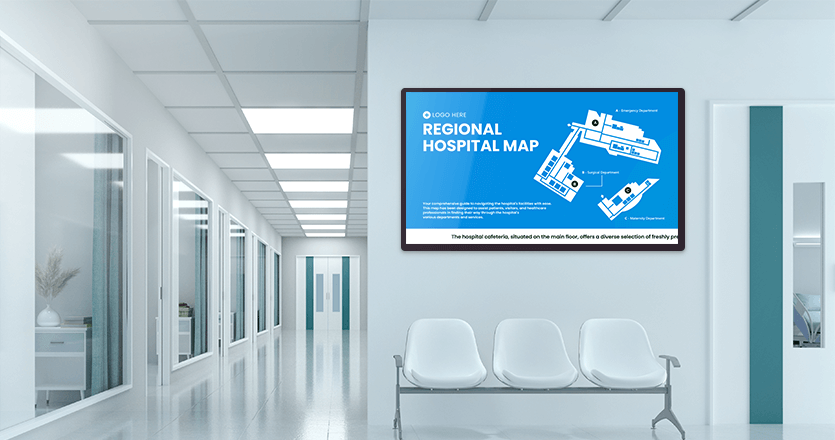
💡When AOK Niedersachsen, one of Germany’s largest health insurers, needed to modernize communication across 100+ service locations, they deployed 90 displays managed through Yodeck’s digital signage CMS. The setup reduced maintenance effort while keeping visitor-facing content current across all sites.
3. Education and university campuses
Campuses deal with constant change: room reassignments, new semester schedules, and visiting lecture locations. A digital directory board at building entrances keeps students, faculty, and visitors oriented without relying on outdated printed maps or floor plans. ✔ Education digital signage keeps campuses easy to navigate.
4. Retail, malls, and mixed-use spaces
A digital mall directory helps shoppers locate stores, restaurants, and services. Mixed-use developments benefit even more, since they combine retail, office, and residential tenants in a single building. Digital directory signage can serve all three audiences from one screen, rotating between store listings, office directories, and resident information. ✔ Retail digital signage helps malls guide visitors and promote stores.
5. Hotels, churches, and other multi-room venues
Hotels use digital guest directories in lobbies to display amenities, event schedules, and local recommendations. Churches display service times, room assignments for groups, and event programs. Conference centers rotate between session schedules and speaker information. In each case, a digital room directory replaces the printed inserts and letter boards that someone has to manually update before every event. ✔ Digital signage for events helps venues manage schedules and attendees.
Software-based directories vs. Dedicated kiosk systems
If you’re researching digital building directory options, you’ll notice the market splits into two camps. Understanding the difference upfront saves time and budget.
| Software + Commercial Display | Dedicated Kiosk Hardware | |
|---|---|---|
| Upfront cost | $300–$1,000 (screen + player) | $2,000–$20,000+ |
| Ongoing cost | $0–$30/screen/month (software) | Varies; often includes service contracts |
| Setup complexity | DIY or light IT support | Professional installation typical |
| Content control | Full, via cloud dashboard | Varies by vendor; some require vendor support |
| Touchscreen capability | Optional (add a touchscreen display) | Built-in |
| Scalability | Add screens and players as needed | Custom orders per unit |
If the software-based approach fits your setup, Yodeck’s free plan lets you get started at no cost. For touchscreen environments, the Interactive Kiosk app adds tap-to-explore functionality: your screen displays directory content on a loop, then switches to interactive content when a visitor engages.
What to look for in digital directory software
These are the capabilities that matter most when you’re evaluating platforms for building directory use:
Cloud-based remote management. You should be able to update any screen from any browser, without physically visiting the building. This is non-negotiable for multi-location deployments.
Template library and design flexibility. Pre-built layouts speed up launch. A layout editor that supports custom branding (your logo, colors, fonts) keeps directories consistent across locations. Branded digital signage templates that your team can reuse without starting from scratch are even better.
Real-time updates with no vendor dependency. If changing a tenant name requires a support ticket or a call to your provider, the system is too rigid. Anyone on your team should be able to make edits and push them live in minutes.
Multi-screen and multi-location management. One dashboard that controls every digital directory display across floors, buildings, or cities. Look for role-based access so local teams can manage their own content without affecting other locations.
Scheduling and content rotation. A directory doesn’t have to show the same thing 24/7. Schedule event information during conferences, rotate promotional content during business hours, and display emergency protocols when needed.
Hardware flexibility. The software should work with the screens and media players you already have, or plan to buy, rather than locking you into proprietary hardware.
Integration options. Calendar syncs, visitor management systems, emergency alert feeds, and data dashboards all extend the value of a digital directory beyond a simple tenant list. The more your directory connects to existing systems, the less manual upkeep it requires.
How to set up a digital building directory
1. Plan your content and information architecture
Start with what visitors actually need when they walk in. For most buildings, that’s a tenant or department list, floor assignments, and a basic map. Decide whether you also want to display event schedules, emergency information, or promotional content. The simpler the first version, the faster you launch. You can always add layers later.
2. Choose your hardware and placement
A standard commercial display (43″–55″) mounted in the lobby or at each floor entrance covers most use cases. Pair it with a media player, and you have a working digital directory board. Portrait orientation works well for vertical tenant lists. Landscape fits better if you’re combining a directory with a map or split-layout content. If you need touchscreen interaction, budget for a touch-enabled display.
3. Design, deploy, and maintain
Use your digital directory software’s template library or layout editor to build a branded directory screen. Match it to your building’s visual identity so it looks intentional, not like an afterthought. Once the design is set, push it to your screens remotely and assign a team member to own updates. The biggest risk with any digital building directory isn’t the technology. It’s letting the content go stale because nobody is responsible for keeping it current.
💡 Pro tip by Yodeck Team: Use Yodeck’s Branded Templates feature to create a single directory layout that any team member can reuse across locations. Design it once, lock the structure, and let local teams update only the content fields they need to change.
How much does a digital building directory cost?
It depends entirely on which approach you take.
| Software + Display | Dedicated Dedicated Kiosk | |
|---|---|---|
| Hardware | $400–$800 (screen + media player) | $2,000–$20,000+ (enclosure + display) |
| Software | $0–$25/screen/month | Often bundled or custom-quoted |
| Installation | DIY or light IT support | Professional installation typical |
| Content updates | Self-serve, included in subscription | May require vendor support |
| Ongoing maintenance | Minimal | Service contracts common |
For most office buildings, clinics, and schools, the software-based route delivers everything they need at a fraction of the kiosk price. Organizations that need freestanding touchscreen units in high-traffic public spaces should budget for dedicated hardware.
One thing to factor in, either case: the real long-term cost of a directory isn’t the hardware or the subscription. It’s the cost of outdated information. A printed directory that requires a $200 reprint every time a tenant changes will cost more over two years than a digital setup that someone on your team updates in 30 seconds.
> If you’re comparing platforms, it’s helpful to review typical digital signage pricing models. <
Build your digital building directory with Yodeck
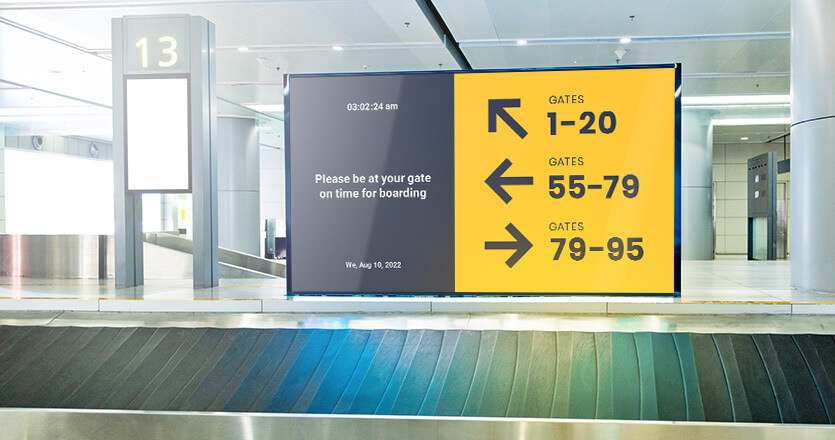
Yodeck gives you everything covered in this guide without the complexity or cost of a dedicated kiosk system.