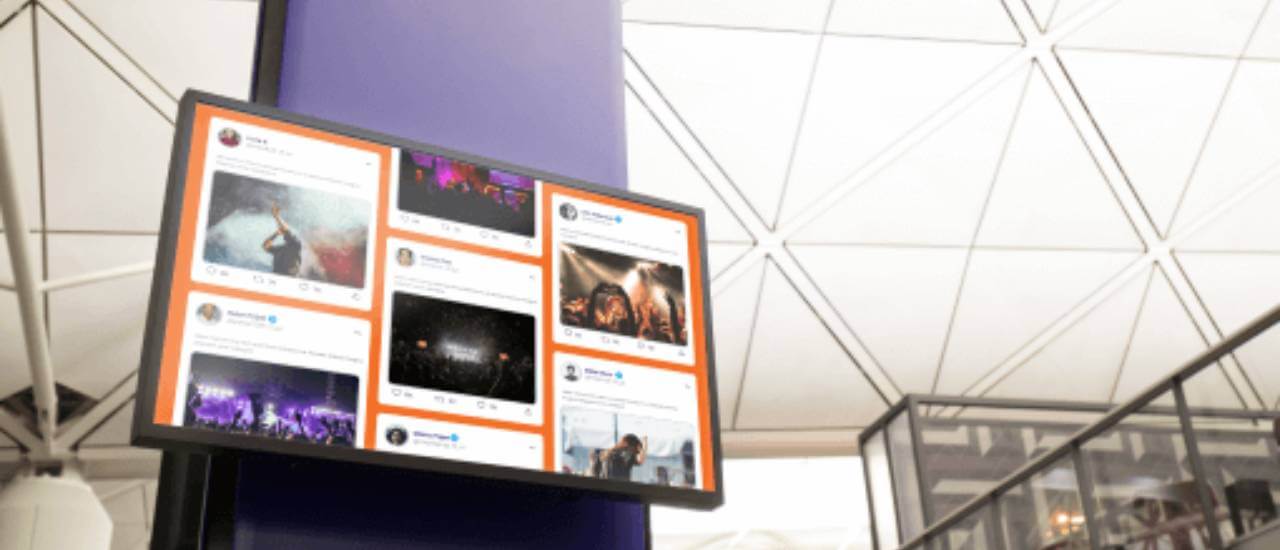
How to turn your screens into live social hubs that drive engagement, user-generated content, and brand visibility.
Key Takeaways
A social media wall is a live, curated feed that aggregates posts from social media platforms and displays them in one place. Content gets pulled from sources like Instagram, Facebook, X, LinkedIn, and TikTok using hashtags, account handles, or mentions. The feed updates automatically, so new posts appear without anyone touching the screen.
Social media walls show up in two main contexts: embedded on websites to build social proof, and displayed on physical screens at events, in stores, or across office lobbies using digital signage software. On digital signage, they turn a static display into a live connection between your online audience and anyone standing in front of the screen. You may also hear them called hashtag walls, social feed walls, or simply social walls.
Why social media walls work on digital signage
Social media walls aren’t new, but putting them on physical screens changes the dynamic. A social feed on a website competes with every other tab your visitor has open. A social wall on a screen in your lobby, storefront, or event hall has a captive audience. That’s a different kind of attention.
#1 Social proof at the point of decision. When a customer walks into your store or restaurant and sees real people posting about your products, that’s social proof landing exactly where it matters. It’s not buried three clicks deep on your website. It’s right there at the moment they’re deciding whether to buy, stay, or engage.
#2 Content that creates itself. Most digital signage content needs someone to design, approve, and upload it. A social media wall pulls fresh content from your audience automatically. That doesn’t mean zero effort (you still need moderation), but the creative heavy lifting shifts from your team to your community.
💡 Bazaarvoice’s 2024 Shopper Experience Index, a survey of over 8,000 global shoppers, found that 65% rely on user-generated content when making buying decisions, rising to 80% among Gen Z. For any business with a screen in a customer-facing space, that’s a strong case for putting a social wall on it.
#3 Bridging online and offline. Your social media following lives on phones. Your customers are standing in a physical space. A social wall connects those two worlds. When someone sees their own post on a screen, the feedback loop tightens: they post more, their followers see it, and your reach grows without you spending a dollar on ads.
#4 Authentic content you don’t have to create. User-generated content carries more trust than branded marketing because it comes from real people with no incentive to oversell. Displaying UGC on screens lets you benefit from that trust at scale, across every location where you have a display.
Types of social media walls
There are a few different types of social media walls, each serving a different purpose. The right type depends on where you’re displaying it, what content you have access to, and what you want your audience to do.
- Hashtag walls tend to work best for time-bound campaigns where you want to drive participation around a specific tag.
- UGC walls are stronger for ongoing social proof, especially in retail and hospitality, where customer photos do the selling for you.
- Single-platform feeds are the simplest to set up and work well when your audience lives on one channel.
- Aggregated walls give the fullest picture but need more moderation since you’re pulling from multiple sources.
| Type | Best for | Content source | Example use |
|---|---|---|---|
| Hashtag wall | Events, campaigns, product launches | Posts tagged with a specific hashtag across platforms | Conference screen showing all posts tagged #YourEvent2025 |
| UGC wall | Retail, hospitality, brand building | Customer photos, reviews, testimonials | Restaurant displaying customer food photos from Instagram |
| Single-platform feed | Offices, lobbies, simple setups | One account (e.g., your company LinkedIn or Instagram page) | Corporate lobby showing the company LinkedIn feed |
| Aggregated multi-platform wall | High-traffic spaces, flagship locations | Combined feed from Instagram, Facebook, X, LinkedIn, and more | Retail storefront blending Instagram posts, Facebook reviews, and X mentions into one display |
Social media wall ideas that actually work
The concept is simple. The execution is where most businesses stall. Here are practical setups by setting, with specific content strategies that go beyond “just show your feed.”
A social media wall for events works best when it gives attendees a reason to post. Create a campaign hashtag, display it prominently near the screen, and let the wall do the rest. As posts roll in, the screen becomes part of the event itself rather than background noise.
For multi-day conferences, rotate the wall’s focus: day-one highlights, speaker quotes, and attendee reactions. After the event, the same content becomes a recap asset for your website or post-event email campaign. Hybrid events benefit too. A social wall on the livestream bridge gives remote attendees visibility alongside the in-room crowd.
「 Digital signage for Events 」
💡 Pro tip by Yodeck Team: If you’re running a social wall at an event, schedule it as part of a playlist rather than running it full-screen all day. Mix it with sponsor content, session schedules, or wayfinding maps so the wall stays fresh and the screen earns its real estate.
In retail, a social wall near the entrance or point of sale puts customer endorsements exactly where hesitation happens. Show tagged photos of real customers wearing your products, unboxing purchases, or reviewing menu items. It’s social proof that doesn’t feel like advertising because it isn’t.
Restaurants can pair a social wall with a simple table tent or counter card: “Tag us @yourhandle and see your photo on our screen.” The result is a self-reinforcing loop. Customers post, the screen updates, other customers see it and want to participate.
「 Digital signage for Retail & Digital signage for Restaurants 」
A social wall in the office doesn’t have to be external-facing. Pull from your company LinkedIn page to showcase team wins, new hires, press mentions, and employee milestones. It turns a lobby screen or break room display into a culture-building tool without anyone on your comms team manually updating slides.
For companies with distributed teams, this is especially useful. A screen in each office showing the same company-wide feed creates a shared sense of what’s happening across locations. And if you’re on a tight budget, a single-platform LinkedIn feed on a free digital signage plan is enough to get started.
「 Digital signage for Offices 」
Universities and schools can use social walls to amplify student life, promote campus events, and build alumni engagement. A hashtag wall during orientation week or homecoming gives students a reason to post while making the campus feel more connected.
Between events, a campus Instagram feed on screens in common areas keeps the content flowing without anyone touching the CMS. It’s low-effort, high-visibility content that students actually want to see.
「 Digital signage for Education 」
How to create a social media wall for digital signage
Setting up a social wall on your screens is simpler than most people expect. You need two things: a tool to collect and curate social content, and a digital signage CMS to push it to your displays. Here’s how it comes together.
Sign up for free and start displaying social media walls on your screens in minutes.
No credit card required.
What to look for in social media wall software
Whether you’re evaluating a standalone aggregator or a signage platform with built-in social features, these are the criteria that matter:
How Yodeck makes social media walls easy
Yodeck gives you multiple paths to social content on screens, depending on how simple or advanced your setup needs to be.
Using a different social wall tool? Yodeck’s Embed app displays any web-based social wall by URL, so you’re never locked into a single provider.
The real advantage is what happens after the content reaches your screen. Schedule social walls into playlists alongside other signage content, manage everything from a centralized cloud dashboard, and push updates across every display from one place. One screen in a café or hundreds across multiple locations, same workflow.
Yodeck’s free plan is ideal if you want to set up a social wall, test it in your space, and see how it performs before scaling. Get started for free and put your social feeds on screen today. No credit card required.