


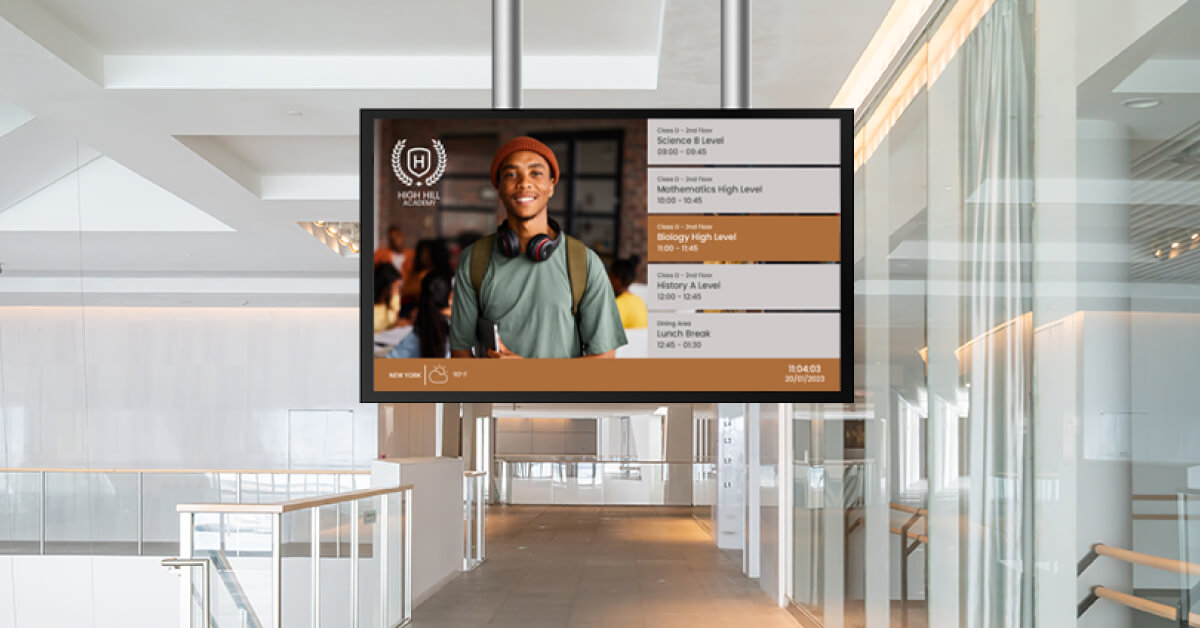
A business guide to digital display boards: what they are, which type fits your space, what they cost and how to turn any TV into one with software.
Key Takeaways
In most offices the display board is still a cork board by the kitchen, or a printed A4 taped to the lift door. Half the notices are out of date and nobody checks the other half. A digital display board fixes the first problem and, if you run it on software rather than a one-off hardware install, the second one too. This guide covers what a digital display board is, the types worth knowing, whether you need a commercial screen, how to build one from a TV you already own, and what it costs.
What is a digital display board?
A digital display board is a screen that shows notices, schedules, metrics or announcements, with the content managed remotely through software instead of pinned, printed or written by hand. It replaces the traditional display board, the rigid cork, foam or whiteboard surface that holds paper notices, and it can be a TV in a lobby, a monitor by the production line or a large screen in a staff canteen.
The difference between a display board and a digital display board is not the screen. It is who updates it and how. A printed board gets updated when someone remembers, prints and walks over. A digital one gets updated from a laptop, on a schedule, across every location at once. Electronic display board, digital board display and digital notice board all describe the same setup.
Three parts make up any digital display board: the screen, a small media player that drives it (or a smart TV app that does the same job), and the content management system (CMS) you log into to decide what plays and when. The rest of this guide takes those parts in turn: the board types you can build, the screen decision, the setup steps, and the costs.
Types of digital display boards and what each one is for
Every digital display board runs on the same hardware. What separates the types is the job the content does, and that job decides where the screen goes, how often it changes and who owns it.
Digital notice boards and office communication boards
The office communication board is the most common digital display board in business, and the one most likely to replace a cork board. An office board sits where people pass or pause: the lobby, the kitchen, the lift lobby, the open-plan floor. The board carries company announcements, HR deadlines, meeting room availability, new starters, birthdays and the occasional safety reminder. Office digital signage of this kind is usually owned by internal comms or the office manager, and the content changes daily.
The cork board it replaces has a reach problem, and so does email. Gallup found that only 20% of employees worldwide were engaged at work in 2025. Engagement has many causes, and one of the few an office manager controls is whether people can see what is going on without digging through their inbox. A screen by the coffee machine reaches the people who never open the all-staff newsletter.
A digital notice board is the same board with a narrower brief: notices only, often in a shared building, school corridor or community space. If that is what you need, a dedicated digital bulletin board setup with a few recurring content slots does the job.
Digital production display boards for the factory floor
On a production floor the board shows numbers, not notices. Shift targets, units produced against plan, downtime, safety days without incident, the next changeover. A digital production display board pulls those figures from a spreadsheet, a dashboard tool or an ERP and puts them where the shift can see them without stopping. Compared with a whiteboard updated once a shift, the live board removes the gap between what the line is doing and what the line thinks it is doing. The layout rules for manufacturing information displays are stricter than for an office board: large type, high contrast and few words per screen, because people read them from ten meters away while moving.
Digital presentation and project boards for teams
A digital project board is the team-level version. The project board lives beside the team that owns it and shows the sprint board, the pipeline, the support queue or the campaign calendar. Teams that run standups around it tend to keep it honest because everyone can see it all day. Tools such as Monday.com, Microsoft Planner, Jira, Airtable and Power BI display directly through signage apps, so the board updates itself. A digital presentation board is the same screen in a meeting room, used for the weekly review and then handed back to signage content between meetings. Both are a form of TV dashboard displays, and the same rule applies: one dashboard per screen, refreshed automatically, with no login prompt sitting on the screen all day.
Digital display boards for schools
Schools use digital display boards in corridors and reception for timetables, event reminders, lunch menus and emergency messages. The brief is similar to the office board with one difference: content has to be approved by a small number of staff, and it has to be quick to change on the day a trip is cancelled. Digital signage for schools setups usually give two or three staff publishing rights and everyone else a simple way to send content in.
| Board type | What it shows | Where it lives | How often it changes | Typical screen |
|---|---|---|---|---|
| Office communication board | Announcements, events, HR reminders, celebrations | Lobby, kitchen, open-plan floor | Daily | 43 to 55 inch TV |
| Digital notice board | Notices and schedules only | Shared buildings, corridors, community spaces | Weekly | 43 to 50 inch TV |
| Production display board | Output vs target, downtime, safety metrics | Factory floor, warehouse | Live, from a data source | 55 inch or larger commercial display |
| Project or presentation board | Sprint boards, pipelines, dashboards | Team area, meeting room | Live, from a data source | 43 to 55 inch TV or monitor |
| School display board | Timetables, menus, reminders, alerts | Reception, corridors | Daily | 43 to 55 inch TV |
| Menu board | Menu items and prices | Canteen, cafe, counter | Per service | Commercial display, often portrait |
Do you need a commercial display or will a TV do?
For an indoor office board that runs during working hours, a consumer TV does the job. A commercial display earns its price when the screen runs around the clock, sits in direct sunlight or hangs in portrait.
Hardware sellers have a reason to steer you toward commercial panels, so here is what the difference buys. According to Samsung, consumer TVs are designed for roughly eight hours of use a day and typically output around 250 nits of brightness, while commercial displays are built to run 24/7, reach up to 2,500 nits and usually ship with a three-year warranty against one year for a TV. For a lobby screen that switches on at 8AM and off at 7PM, none of those three gaps matters much. For a production board running three shifts under factory lighting, all of them do.
There is one more practical difference. Consumer TVs boot to a home screen, pop up software update prompts and sometimes switch input on their own. A media player with CEC control, or a signage app running on the TV itself, handles most of that, but a commercial display is quieter to live with. If you are buying new and the price gap is small, take the commercial panel. If you already own a TV, use it and spend the money on a second screen.
| Feature | Consumer TV | Commercial display |
|---|---|---|
| Rated daily use | About 8 hours | 24/7 |
| Typical brightness | 250 nits, up to 400 with HDR | 500 to 2,500 nits |
| Warranty | Usually 1 year | Usually 3 years |
| Portrait mounting | Not supported by most models | Supported |
| Price, 43 to 55 inch | $300 to $800 | $1,000 to $2,500 |
| Suits | Office, school, meeting room, canteen | Factory floor, window, 24-hour sites, portrait menu boards |
Brightness, warranty and duty figures from Samsung; price ranges from the cost section below.
How to make a digital display board with digital signage software
You can make a digital display board from any TV in under an hour, and most of that hour is waiting for the TV to mount. The software route beats a standalone electronic display board because the content lives in the cloud, so you update it from your desk, schedule it in advance and copy it to the next screen without touching a USB stick. The steps below assume you want to turn any TV into digital signage rather than buy a sealed unit.
Step 1: Pick the screen
Use the TV you have, or buy a 43 to 55 inch model for a lobby or kitchen. Check it has a free HDMI port and that you can reach a power socket and either Wi-Fi or a network cable. Mount it at eye level where people pause, not where they rush past. For portrait boards or 24-hour use, go back to the commercial display section above.
Step 2: Add a media player
The player is the small box that stores and plays your content. Options run from a $30 streaming stick to a purpose-built player at around $80 to $150. A Raspberry Pi-based player such as the Yodeck Player, an Amazon Fire TV Stick, an Amazon Signage Stick, or the signage app on an LG webOS, Samsung Tizen or Android TV all work. Compare digital signage media players by budget before you buy, and check your TV first: a recent smart TV may not need a separate player at all.
Step 3: Connect it to the software and pick a template
Create an account, add the screen, and pair the player by entering the code it shows on the TV. Then choose a layout. Starting from one of the ready-made digital signage templates is faster than designing from scratch: pick a notice board, dashboard or welcome layout, swap in your logo and colors, and the board is live. Add the apps you need, such as a calendar, weather, a news ticker or a Teams channel feed, and they update themselves.
Step 4: Schedule content and set working hours
The last step is what makes the board low-maintenance. Build a playlist for the default content, then add scheduled items: the all-hands reminder that appears for three days and disappears, the Friday menu, the quarterly results slide that runs only during the town hall. Then set working hours so the screen switches itself off at night and on in the morning.
💡 Pro tip by Yodeck Team: Set working hours per screen, not per account. The lobby board can run 7AM to 8PM while the warehouse board follows the shift pattern, and special hours cover public holidays without anyone remembering to switch anything off.
How much does a digital display board cost?
A single indoor digital display board costs between $400 and $2,500 upfront, and the spread comes almost entirely from the screen you choose. Software adds $0 to $30 per screen per month, and the first screen is free on some platforms, including Yodeck.
The cost breaks into four parts. The screen is the big one: $300 to $800 for a consumer TV, $1,000 to $2,500 for a commercial display. The player is $30 to $50 for a streaming stick, $80 to $150 for a purpose-built signage player, or nothing if you use a smart TV app. Software runs from free for one screen to around $8 to $16 per screen per month on standard business plans. Installation is $0 if you mount it yourself, $200 to $500 per screen for a professional indoor install. The full breakdown, including electricity and three-year ownership figures, is in the digital signage costs guide.
| Component | Budget setup | Standard office setup | Commercial setup |
|---|---|---|---|
| Screen | Existing TV, $0 | 50 inch consumer TV, $400 to $600 | 55 inch commercial display, $1,200 to $2,000 |
| Media player | Streaming stick, $30 to $50 | Signage player, $80 to $150 | Signage player, $80 to $150 |
| Software, per month | Free plan, 1 screen | $8 to $12 per screen | $12 to $16 per screen |
| Installation | DIY, $0 | DIY or handyman, $50 to $200 | Professional, $200 to $500 |
| Upfront total | $30 to $50 | $530 to $950 | $1,480 to $2,650 |
Large organizations land at the top of that range or above it, because they add managed installation, IT support and a fixed refresh cycle on top of the hardware. An office that starts with one existing TV and the free plan sits at the other end of the same scale, and can move up the table one screen at a time.
One budgeting mistake to avoid: comparing the software subscription against a one-off hardware board and calling the hardware cheaper. A sealed electronic display board with built-in content still needs someone to walk over with a USB stick every time a notice changes. That time is the real recurring cost, and it is the one the subscription removes.
How much is a digital advertising board?
An indoor digital advertising board, the kind in a shop window, a waiting area or a venue lobby, costs $500 to $3,000 for the screen, player and software, using the same components as any other digital display board. The price jumps when the board moves outdoors: an outdoor LED marquee or roadside board starts at about $10,000 installed, because weatherproofing, brightness and the LED cabinet itself cost far more than an indoor panel.
If you want to sell screen time to advertisers rather than show your own promotions, the screen is the cheap part. The scheduling, campaign rotation and multi-location control come from the software, and DOOH advertising setups are built on exactly the same CMS as an office notice board.
What should an office digital display board show?
An office display board works when it shows things people would otherwise ask about, and fails when it shows a looping company video nobody requested. The test for every slide is simple: would someone walk up to the office manager and ask this if the screen were not there?
The content that passes that test is mostly operational. Today’s meeting room bookings and visitors. The all-hands time and link. Deadlines for benefits enrollment or expense claims. New starters and who they report to. Birthdays and work anniversaries, which can pull straight from the HR system rather than a spreadsheet someone forgets. Live transit times and weather for the people deciding when to leave. A feed from the company’s Teams channel or SharePoint news so the screen reflects what people are already posting. Layer in one or two slides of culture content, a customer win or a photo from last week’s event, and the board earns a glance every time someone passes.
Visma, a Northern European software company with more than 7,000 employees, runs Yodeck screens across three global offices. Its software teams use them as digital project boards showing service health dashboards and alerts, while the HR team shows announcements, events, local office news, weather and public transport schedules. Training the HR team took about half an hour, and the IT team has not had to step in since. As Vidar Ellingsen, application management engineer at Visma, put it, “The best part? We were up and running in literally five minutes.”
If you want a longer list to pick from, the digital bulletin board ideas guide groups 30 content types by the job they do. You can test any of them on one screen for free before deciding what the second screen should show.
Why offices run display boards on software instead of standalone hardware
The case for software comes down to what happens after the first screen. A standalone electronic display board is a single object you maintain by hand. Digital signage software treats every board, in every office, as one account you manage from a browser, so the second, tenth and fiftieth screen cost the same effort as the first.
For an office or facilities manager, the day-to-day difference looks like this. Content is scheduled once and plays on time, including switching screens off at night. Players store content locally, so a board keeps running through an internet outage for up to a month and simply picks up new content when the connection returns. And the apps, 160+ of them, plus 800+ templates, mean the board shows live data from the tools the office already uses rather than slides someone has to rebuild.
💡 Product highlight: Yodeck holds a 4.7 out of 5 rating across more than 3,000 verified reviews on G2, and ease of use and easy setup are the two things reviewers mention most. For a board that an office manager, not an IT team, will run day to day, that is the number that matters.
Getting your first digital display board live
The cheapest digital display board you can build is the TV already on your wall, a $30 stick and a free account. If the notices on it get read, you have your business case for the second screen, and you can have the first one live this afternoon. More than 65,000 organizations run their screens this way, and most of them started with one.