


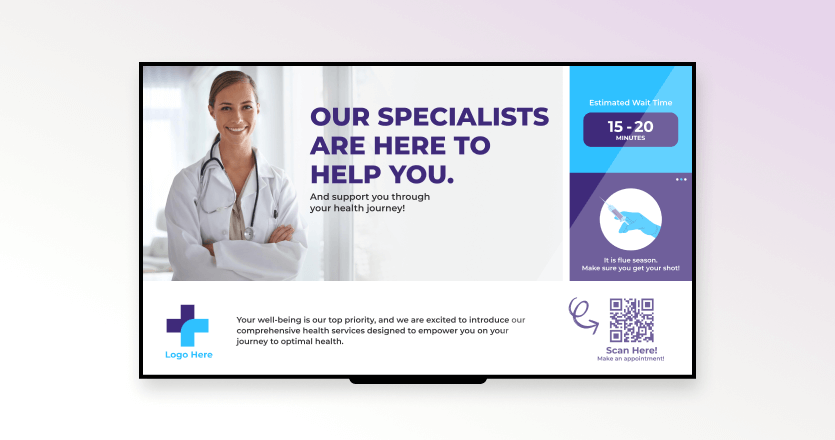
Build a waiting room TV that informs patients and customers, runs without cable and costs nothing to start.
Key Takeaways
Most waiting room TVs are switched on, tuned to a news channel and forgotten. The practice pays for cable and patients watch headlines that raise their stress, while the screen says nothing about the place they are sitting in. A waiting room TV earns its wall space when it answers the questions people have while they wait: how long, what happens next, where to go, what this practice offers. This guide covers what to show, how to set up a waiting room TV on any screen without a cable subscription, what it costs, where the legal lines are and how the needs of a medical office, a dental practice and a tire shop differ.
Why do waiting rooms have TVs? Not for the reason you think
Waiting rooms have TVs because waiting feels longer than it is, and a screen is the cheapest thing you can put in front of that feeling. The TV itself does not fix it. Information does: how long the wait is, what happens next and whether anyone has noticed you are there. That is why waiting room signage has moved from printed notices to a managed screen in most practices.
The research says the same thing, and it is not what most vendors claim. In a study of 337 outpatients across three Dutch hospitals, Pruyn and Smidts found the waiting environment predicted satisfaction more strongly than the minutes actually waited, and that TVs on their own did not shorten perceived waiting time. Short, ad-heavy programming may even have lengthened it. The paper is hosted by The Center for Health Design. The lesson for a practice manager: a TV tuned to daytime cable is not neutral, and a screen that answers questions takes those questions off the front desk.
What to put on a TV in a waiting room
Put information first, calm filler second and promotion last. A waiting room TV works when the person sitting in front of it can answer “how long?” and “what happens next?” within the first minute of looking at it. Everything else is there to keep the screen from feeling like a sales loop.
The 70/20/10 content mix
A simple ratio keeps the playlist honest. Around 70% of screen time goes to information people came for: current wait estimates, how check-in works, what to expect during the visit, opening hours, parking, insurance and payment notes, seasonal reminders such as flu shots or back-to-school checkups. Around 20% goes to calm filler that gives the eye a rest: local weather, a slow slideshow of the neighborhood or your team at work, a word of the day, a quiet nature loop. The last 10% is promotion: a new service, a referral program, a review request with a QR code.
Most of this comes ready-made. A weather app, a news headline feed with the sound off, a Google Calendar of open clinic days or a Canva slide you update once a month are all standard digital signage apps and need no design skills. The one piece that makes the biggest difference is also the one most practices skip: a short “what to expect at your visit” sequence.
There is evidence for that specific piece. In an emergency department study of 1,132 patients, Papa and colleagues found that a waiting room video explaining what would happen during the visit raised the share of patients rating their visit excellent or very good from 58.1% to 65%, published in the Canadian Journal of Emergency Medicine. Perceived wait time did not change. Satisfaction did. If you only make one piece of custom content for your waiting room TV, make it that one.
Content that backfires
Four things reliably make a waiting room TV worse than a blank wall:
- rolling news with the sound on, which turns a stressful room into a louder stressful room and gives the practice no say in what plays
- split screens with tickers, weather, a clock and a video all at once, which readers cannot follow from across the room
- a loop that is 100% promotion, which people learn to ignore within one visit
- anything that shows a patient’s full name, visit reason or other personal detail, covered under the medical section below
A good default is silence with captions, a playlist of 10 to 15 items that loops every six to eight minutes and one person responsible for refreshing it weekly.
💡 Pro tip by Yodeck Team: Build the “what to expect” sequence as three or four slides, not a video. Slides are easier to update when a step changes, and a template with your logo and two lines of text per slide reads clearly from 15 feet away.
Waiting room TV for medical offices
A medical office waiting room TV has one job above all others: calm the room. People waiting to see a doctor are usually anxious and unsure how long they will be there. The screen should answer the practical questions, reassure without being saccharine and stay quiet. This is the calmest use of healthcare digital signage and the one with the least room for error.
The wait itself is the thing to manage. In a survey of 2,000 US adults commissioned by Klara in May 2025, 52% named sitting in the waiting room for more than 30 minutes as a top turn-off, and 48% said a calm, welcoming environment matters to them. Both figures are reported by Talker Research. You cannot always shorten the wait, but you can stop it feeling open-ended. A screen that shows “current wait: about 20 minutes” and updates when the schedule slips does more for satisfaction than any amount of daytime TV.
Content that works in a medical waiting room, in rough order of value:
- current wait estimate and the order of what happens next (check-in, vitals, provider, checkout)
- what to have ready: ID, insurance card, medication list, forms
- plain-language health reminders tied to the season or the specialty, such as flu shots, screenings or allergy season
- practice information: hours, telehealth options, patient portal sign-up, after-hours line
- a quiet visual break: weather, a slow photo loop, a nature scene
Keep tone and volume low. No sound, no breaking news, no dramatic health warnings. If the practice serves children, a short animated loop in one corner of the day’s playlist is enough; the screen does not need to become a cartoon channel.
HIPAA-safe queue and appointment information
Showing a queue on the waiting room TV is fine. Showing who is in it is not. A screen that displays full names, appointment times with names or visit reasons is disclosing protected health information to everyone in the room, which is the kind of incidental disclosure HIPAA expects a practice to take reasonable steps to avoid. The safe pattern is the one pharmacies and labs already use: a ticket number or initials, a status word (“checked in”, “ready”), and nothing else.
Three rules keep it clean:
- display ticket numbers or first-name initials, never full names, and never a reason for the visit
- point the screen into the waiting area, not toward the entrance or a window where passersby can read it
- keep the queue on its own zone of the layout, away from promotional slides, so nobody confuses a patient status with an advertisement
If your practice management system cannot feed a sanitized queue to the screen, a simple “now serving” number updated by reception from a phone or tablet does the job. Most of the value is in showing movement, not in automation.
Dental waiting room TV
A dental waiting room TV should do two things a medical one does not: take the fear out of the chair and explain treatments patients are too embarrassed to ask about. Dental anxiety is common enough that a share of the people in your waiting room are actively dreading the next 30 minutes, and the screen is the only part of the practice talking to them while they wait.
Dental anxiety changes the content. Short, calm “what happens during a cleaning” or “what a crown appointment looks like” sequences work better here than general health tips, because they answer the fear directly. Cosmetic and elective treatments are the second priority. Whitening, clear aligners, implants and veneers are the services most patients will not raise at the chair but will read about on a screen. A single slide per treatment, one benefit, one line on what it involves and a prompt to ask at checkout is enough. Keep each promotional clip short and give it one message.
The mistakes are the same ones dental marketing consultants have been flagging for years: a loop that is all practice promotion, which patients tune out after one visit; sound, which irritates staff more than patients; and tickers or split screens that pull attention from the treatment message. Dental is also where silent playback matters most, because the practice soundtrack is already drills.
A working dental waiting room TV playlist looks like this:
| Slot | Content | Share of loop |
|---|---|---|
| Reassurance | What to expect in a cleaning, exam or first visit | 25% |
| Practical | Insurance and financing options, hours, hygiene reminders | 25% |
| Treatments | One slide each for whitening, aligners, implants, emergencies | 20% |
| Calm filler | Weather, slow photo loop, trivia or a word of the day | 20% |
| Proof | A review request with a QR code, team introductions | 10% |
For a pediatric dental practice, swap the calm filler for a short animated loop and keep the treatment slides to the parents’ eye level on the layout: the child watches the cartoon, the parent reads about sealants.
Waiting room TV beyond healthcare
Every business that makes people wait has the same screen problem, and most of them have more freedom to sell. An auto service center, a tire shop, a salon, a DMV office, a bank branch, a vet clinic and a pharmacy all have a room full of people with 20 to 60 minutes to fill. The difference from healthcare is that the person waiting is usually a customer rather than a patient, so the balance can tip toward promotion without feeling tasteless.
For an auto service or tire shop, the screen pays for itself by explaining what is being done to the car. A short loop of “what a brake inspection checks”, “why we recommend rotating tires every 6,000 miles” and current service specials turns a bored customer into one who approves the extra work when the advisor comes out. Pair it with a live “vehicles in progress” board, by ticket number, so nobody has to ask at the counter.
For salons and barbershops, the screen is a lookbook and a retail shelf: styles, products on the counter, a loyalty program, Instagram feed with the sound off. For government offices, banks and DMVs, it is closer to the medical model: queue numbers, required documents, service hours, and nothing that competes with the counter calling the next ticket. Pharmacies sit between the two. Prescription pickup status by initials, seasonal health products and vaccine availability are the three things customers look for, and pharmacy signage that shows those three well is enough.
The principle holds across all of them. Tell people how long and what next, give the eye a rest, then sell. In that order.
Can I show TV without a cable subscription in my waiting room?
Yes, and for most waiting rooms it is the better option. There are four legal ways to fill the screen without a cable bill, and only one of them involves broadcast television at all.
The first is your own content: slides, short videos, a queue board and app feeds, played from a small media player in the TV’s HDMI port. This is what digital signage means in practice, and it is the only option where you decide every second of what plays. A streaming stick running Fire TV Stick digital signage software, or a dedicated player the size of a deck of cards, is all the hardware it takes.
The second is a free, ad-supported streaming service made for businesses. These cost nothing because the operator sells the ad breaks, so you give up a share of your screen time and your patients watch ads you did not choose.
The third is an over-the-air antenna. Local broadcast channels are free to receive and, in a small room on a single ordinary TV, fall under the copyright law’s home-style exemption explained below. The trade-off is the same as cable: you do not control the content, and daytime TV is the programming the research says lengthens the wait.
The fourth is a licensed healthcare TV subscription: a library of patient education videos streamed to your screen for a monthly fee. A subscription suits specialty practices with a lot to explain and less need for queue, hours and local information.
For a single-location practice, the first option covers 90% of what the room needs. Your own slides, a video you own and two or three live apps replace cable entirely, and the player keeps running for weeks if the internet drops, because content is stored on the device.
Is showing cable TV in a business waiting room legal?
Only with a public performance license, which a residential cable subscription does not give you. Under US copyright law a dental or medical office is a public space whether or not anyone pays to be there, and the ADA tells its members plainly that infringement can bring statutory damages of $750 to $150,000 per exhibition. The umbrella license it negotiated with the Motion Picture Licensing Corporation ran $349 a year per location for members and $429 for non-members. That is the real cost of “just putting the news on”.
The simplest way around the license is to not need one. Content you make, license or pull from an app with commercial terms, played from a signage player, needs no public performance license. Free digital signage templates for hours, queues, promotions and seasonal notices cover most of what a small practice shows, and the music question disappears when the screen is silent.
There is one exemption, and it is narrower than people assume. Section 110(5) of the Copyright Act, the home-style exemption, allows broadcast or cable signals on a single ordinary household TV with no admission charge. Larger spaces qualify only under 2,000 square feet for most businesses (3,750 for food and drink), or above that with no more than four screens, none over 55 inches. The text is at Cornell Law School. The exemption does not cover streaming apps, DVDs or a residential cable account used in a commercial space.
What is a waiting room channel?
A waiting room channel is programming built for people who are waiting, and the term covers three different business models. Knowing which one you are being sold explains the price.
Ad-funded networks install screens in physician and dental offices at no cost and sell the slots, overwhelmingly to pharmaceutical brands. According to PPC Land, spending on these point-of-care networks reached about $1.2 billion in 2025 and the largest operator reports screens in more than 30,000 doctors’ offices. The practice gets free hardware and a reviewed content library in exchange for drug ads to its patients and limited say over the loop. Subscription healthcare TV services charge a monthly fee for an ad-free, licensed library of patient education videos plus a slide builder for your own messages. Self-managed digital signage means you own the screen and the player, pick free or paid software and build the loop yourself.
| Ad-funded network | Healthcare TV subscription | Self-managed signage | |
|---|---|---|---|
| Who pays | Advertisers | The practice, monthly | Hardware once, free or low software fee |
| What plays | Operator’s loop with ads | Licensed education library plus your slides | Anything you choose |
| Control over the loop | Limited | Partial | Full |
| Queue, wait times, local info | Rarely | Sometimes | Yes |
| Ads shown to patients | Yes | No | Only if you sell them |
The ad-funded channel is free because your waiting room is the product. If that sits fine with your patients and your brand, it is a fair deal. If not, a self-managed waiting room TV costs a one-off player and, for a single screen, no software fee at all.
How to set up a waiting room TV in four steps
Any TV with an HDMI port becomes a waiting room TV with a media player, signage software and a first playlist, and the whole job takes an afternoon. You do not need a commercial display, an IT contractor or a cabling budget for a single room.
- Pick the screen. A 43 to 55 inch consumer TV is right for most waiting rooms. Mount it at seated eye level, not above a door, and angle it away from windows. A Samsung or LG smart TV may run the signage software on its own; any other TV takes a player in its HDMI port
- Add the player. The player is the small device that stores and plays your content, anything from a Fire TV Stick or Amazon Signage Stick to an Android box, a Raspberry Pi based player or a Windows mini PC. For a practice with no IT staff, a preconfigured player that arrives with your Wi-Fi details and playlist already loaded is the one to pick: plug it in and it starts playing
- Choose the waiting room TV software. The software is the web dashboard where you upload slides, pick apps, build the playlist and set the schedule. Choose it on whether it has a free tier for one screen, whether it runs on the player you picked and whether a receptionist can update it from a browser without training
- Build the first loop. Start with the 70/20/10 mix: a “what to expect” sequence, hours and practical notices, a weather or calendar app, one or two promotional slides. Schedule the screen to switch off at closing and back on in the morning, and give one person the job of refreshing the loop weekly
Digital signage software built for small teams keeps the reception desk in charge: content is uploaded once from a browser, a schedule decides what plays when, and if the internet drops the player keeps running the stored loop for up to a month.
If you are running one screen, you can set this up today for free and see it on the wall before you decide anything else. Sign up for a free account and build your first playlist.
How much does a waiting room TV cost?
A single waiting room TV costs a few hundred dollars once, and after that it can run for free. The cable subscription and the licensing fee are the costs most practices pay today without noticing, and both go away when you switch to your own content.
| Item | Typical cost | Notes |
|---|---|---|
| TV, 43 to 55 inch consumer | Roughly $200 to $450 once | You may already own one |
| Wall mount and installation | Roughly $30 to $150 once | Fixed mount, one screen |
| Media player | Roughly $35 to $80 once | Streaming stick to dedicated player; included free with Yodeck annual plans |
| Signage software, 1 screen | $0 | Yodeck Free plan: one screen, no credit card, no time limit |
| Signage software, 2+ screens | From $8 per screen per month | Yodeck Basic plan, billed per screen |
| Content | $0 to a few hours a month | Templates, apps and your own slides |
| Cable or satellite subscription | $0 | Not needed |
| Public performance license | $0 | Not needed for content you own or license through the software |
For comparison, keeping cable on the waiting room TV means the business cable package every month plus the umbrella license, which the ADA figures above put at $349 to $429 a year on its own. The full breakdown of what drives the price of a multi-screen rollout is in this guide to digital signage cost, but for one waiting room the math is simple: hardware once, software free, no license, no cable.
The free tier is the right place to start. Free digital signage for a single screen is a full account, not a trial, so a practice can run the waiting room on it indefinitely and only pay when a second location or a second screen comes along.
Waiting room TV advertising: when it makes sense
Waiting room TV advertising makes sense in two cases: when you are selling your own services to people who are already in the building, and when you have enough screens and traffic to sell slots to local businesses. It does not make sense as the reason to put a screen up, and in a medical waiting room it should stay in the 10% slot.
The first case is the one most practices underuse. A dental office advertising its own whitening or an auto shop advertising its own alignment check is talking to a relevant audience at the moment they are most likely to act. One slide per service, with a next step. Measure it by asking at checkout how they heard about it.
The second case needs scale. A multi-location practice group, a hospital network or a chain of service centers can run a digital signage advertising network across its waiting rooms and sell slots to complementary local businesses: a pharmacy near the clinic, a tire brand in the service center, a dry cleaner next to the salon. The software handles the scheduling and proof of play across sites. The sales effort is yours. Below five or six screens, the revenue rarely justifies the admin, and in healthcare the screen’s calm is worth more than the ad income.
Managing waiting room TV content across locations
Once a practice has more than one waiting room, the question stops being “what should the screen show” and becomes “who updates 12 screens, and how do we know they are all playing the right thing”. That is the problem centralized digital signage solves, and the reason multi-site healthcare groups standardize on one platform rather than a different setup per clinic.
The mechanics are simple. Content is uploaded once and tagged by location or group. A schedule decides what plays where and when. Head office pushes the shared loop (brand, seasonal campaigns, compliance notices) and each clinic adds its local layer (its wait times, its team, its hours). If a player goes offline, the dashboard shows it, and the screen keeps playing its stored loop in the meantime. Nobody drives between clinics with a USB stick.
FYidoctors, a Canadian optometry group, runs this model across more than 350 clinics with more than 480 screens. The FYidoctors case study describes Yodeck as the group’s in-clinic TV system, with screens that “communicate with patients in waiting areas and throughout the clinics”. Players arrived preconfigured with Wi-Fi and playlists, which is what made a rollout of that size plug-and-play. Evan Standerwick, Marketing Operations at FYidoctors, put it this way: “We chose Yodeck because it was the easiest platform to scale, implement, and use.”
Make the waiting room TV work for the room
A waiting room TV pays for itself the first week it answers “how long?” and “what next?” before anyone has to ask. Start with one screen, your own content and the free plan, and add cable, ads or subscriptions only if the room ever needs them. Get started with Yodeck for free.
No credit card required
FAQ
Can I play a slideshow on a waiting room TV?
Yes, and it is the simplest waiting room TV content there is. Build the slides in PowerPoint, Google Slides or Canva, upload them to the signage software and set the time per slide. There are several ways to play a slideshow on a TV, from a USB stick to a smart TV app, but only a signage player lets you update the slides from a browser, mix them with live apps and schedule them. A USB slideshow has to be re-exported and re-plugged every time a price or a name changes.
Is there free waiting room TV software?
Yes. Some digital signage platforms offer a free plan for a single screen with no time limit and no credit card. For a single-location practice that is the whole bill: one TV, one player, free software. Features that matter for a waiting room, such as scheduling, layouts with a queue zone and weather or calendar apps, are included rather than gated behind a paid tier. Paid plans start when you add a second screen.
How often should waiting room TV content change?
Weekly for the practical layer, monthly for the rest. Wait times and daily notices should update as the day goes, which is why a receptionist needs to be able to edit from a browser. Seasonal reminders, promotions and team slides can rotate monthly. A loop that has not changed in three months is the one patients stop looking at, and regulars notice faster than you expect.
Does a waiting room TV need sound?
No. Run it silent with captions. Sound irritates staff who hear the loop 40 times a day, carries into consultation rooms and makes the waiting area louder for people who are already stressed. If a video needs narration, add a caption track or replace it with slides.