


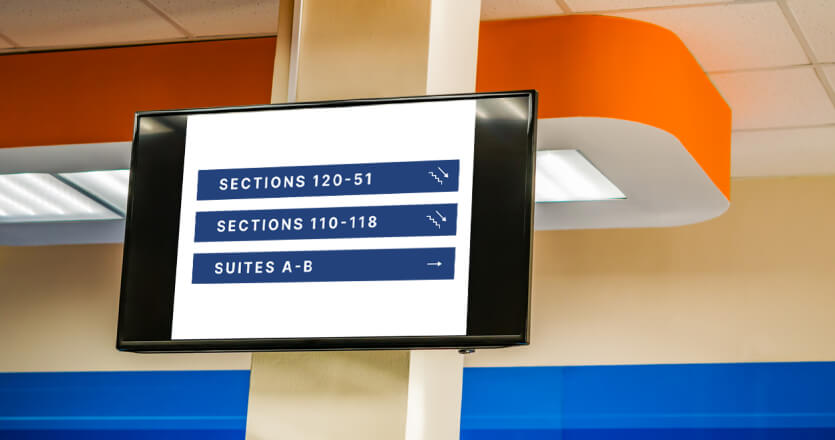
How venues use screens to move fans from the parking lot to their seat and out again, without queues, confusion or reprinted signs.
Wayfinding is a flow problem, not a signage problem: arrival, concourse and exit each need different messages at different moments
Digital signs change with the event: gate closures, queue redirects and exit routes update in one edit instead of a reprint
Screens reach every fan without a download: apps help the fans who install them, screens reach everyone in the building
Emergency messaging rides on the same screens: one override replaces every scheduled message across the venue
One platform, every zone: parking, gates, concourses, bowl and back of house run from a single dashboard with zone-level control
Forty thousand people arrive in the same hour, most of them in the last 20 minutes, and every one of them has the same question: where do I go? Stadium wayfinding answers that question at each point of the journey, from the parking lot to the turnstile to the seat. Printed signs answer it once, for one configuration of the building, and never change. Digital signage answers it differently for a Saturday match, a Tuesday concert and a 9PM evacuation.
This page covers wayfinding and crowd messaging only: where screens go, what they show at each moment, how they fit safety and accessibility rules and what software runs them. For concession menus, sponsor rotation and live stats, see the stadium digital signage guide.
What is stadium wayfinding signage?
Stadium wayfinding signage is the system of signs that moves a fan from the edge of the venue to a specific seat and back out, using a consistent hierarchy of locations. Wayfinding digital signage is the part of that system that runs on screens rather than print, so the message can change by event, by hour and by what is happening in the building.
Stadium signage falls into three families, and the distinction matters because the rules differ for each. Safety signage covers emergency exits, first aid points and prohibition signs, and it is regulated: size, color and shape are set by local standards, and screens can repeat these messages but never replace the physical signs. Information signage includes maps, directional arrows, section markers and venue rules, which is where most wayfinding lives and where design is flexible as long as it stays clear. Commercial signage covers sponsor boards, totems and promotions, and FIFA’s guidance is that it must stay visibly distinct from wayfinding and safety signs so neither competes with the other.
The structure behind good wayfinding is a hierarchy. FIFA describes seven levels for large stadiums: precinct, entrance gates, levels, sectors, seating blocks, rows and individual seats. Each sign on the route should name the next level down and nothing more, so a fan at the gate sees levels and sectors, not row numbers. The same guidance asks that sector colors on signs match the colors printed on tickets, which is the single most common thing venues get wrong when they refresh branding but not ticketing.
| Printed wayfinding signs | Digital wayfinding screens | |
|---|---|---|
| Change a message | Reprint and reinstall | Edit once, live on every screen in seconds |
| Event-specific routing | Same arrows for every event | Different routes for a match, a concert and a conference |
| Closed gate or full restroom | Staff with a megaphone | Screen redirects to the next nearest option |
| Emergency use | Fixed exit signs only | Scripted alert replaces all content on all screens |
| Cost per change | Rises with every event | Flat after installation |
| Accessibility | One size, one language | High contrast, larger type, alternate languages by schedule |
Printed and digital signs both have a place in a stadium. Regulated safety signs stay physical. Everything that changes with the event belongs on a screen.
Why wayfinding decides the fan experience before kickoff
Fans form their opinion of a venue before they sit down. Deloitte surveyed more than 15,000 fans across seven US leagues and found that a core four of attributes outweighs every other stadium factor by more than 50%, and a safe, comfortable and clean stadium is one of the four. For casual fans, the group a venue most needs to convert into repeat visitors, the gap widens to 75%. A fan who spent 25 minutes finding Section 214 does not rate the venue as comfortable, however good the seat turned out to be.
Wayfinding failures hit fans with access needs hardest. The Level Playing Field annual fan survey, reported by DJS Research, found that 30% of disabled fans feel unable to attend some venues at all, and 37% named better accessibility information as a matchday improvement they want. Accessibility information is the cheapest fix on that list, and screens are the fastest way to deliver it at the point where the fan needs it.
For venue operations teams, the business case is simpler still. Every fan who cannot find a gate, a restroom or an exit asks a steward. Every steward answering the same question is a steward not watching the crowd.
Where digital wayfinding signage goes in a stadium
Wayfinding works when the right message sits at the decision point, so the placement plan follows the fan’s route rather than the floor plan. Five zones cover almost every sports stadium wayfinding problem.
Parking lots and transit arrival
Arrival is where wayfinding starts and where most venues have no screens at all. FIFA’s guidance treats the precinct as the first level of the hierarchy, and large sites often have several entrances that each lead to different sectors, which means a fan who parks on the wrong side walks the full perimeter. Screens at lot entrances, drop-off points and transit exits fix this with three messages: which lots are full, which gate serves which sections and how long the walk is.
The same screens earn their place twice. Before the event they route arrivals. After it they show train and bus departure times, rideshare pick-up zones and which lot exits are open, the job that transportation digital signage does in stations every day. Outdoor placements need high-brightness displays and weather-rated enclosures, so plan these screens with the AV integrator rather than the content team.
Examples of wayfinding stadium digital signage in the parking zone: a lot-status board at the main vehicle entrance, a “Gates A and B this way” screen at the transit exit and a walking-time sign at the far end of the precinct.
Entrance gates and security lines
Gates are where queues form and tempers fray. The messages that matter here are the ones fans need before they reach the front: bag policy, prohibited items, whether tickets must be open on a phone and which gate is closed. A fan who learns about the clear-bag rule at the turnstile walks back to the car. A fan who reads it on a screen 50 meters out has time to act.
Entry flow at a stadium gate is measurable. Researchers at IE Research Datalab modeled crowd movement at San Mamés during entry for the 2025 UEFA Europa League final and found that guiding fans with suggested access routes lowered crowd density by roughly 20%. For an operations manager, that is the difference between a queue that moves and a queue that needs stewards pulling people out of the crush. Screens are the only guidance channel that can change the suggested route in the middle of the surge.
Examples for the gate zone: a queue-time board above each gate cluster, a policy screen at the start of the line and a redirect screen that switches from “Gate C” to “Gate C closed, use Gate D” the moment security calls it.
Concourses: sections, restrooms and the intermission surge
Concourses carry two kinds of traffic at two different times. Before the event, fans are hunting for a section. At halftime or intermission, everyone leaves the bowl at once and hunts for restrooms and concessions, then needs to get back before play resumes. A printed sign shows the same arrow to the same restroom at both moments. A screen shows “Section 201 to 230 this way” at 6.45PM and “Shorter restroom queues at Section 225” at 8.10PM.
A queue redirect is the highest-value wayfinding message in a stadium. A redirect spreads load across facilities that would otherwise sit empty while the nearest one queues out the door, and it does so without a steward standing in the corridor pointing. Pair concourse screens with the section numbers painted on columns so the screen says where to go next and the column confirms the fan has arrived.
Examples for the concourse zone: a junction screen at every concourse intersection showing section ranges in each direction, a restroom and concession locator that switches to queue guidance at intermission and a screen above each vomitory confirming the section range through it.
Seating bowl and section markers
Inside the bowl, wayfinding is about confirmation rather than direction. FIFA’s guidance asks for rows marked at both ends and on aisles, sequential seat numbers and sector colors that match the ticket. Screens play a smaller role here, mostly at vomitory entrances where a short loop confirming “Section 118, rows A to Z” prevents the fan from climbing to the wrong tier.
The one thing to avoid is a wayfinding screen that competes with the scoreboard or sponsor boards for attention. Keep bowl screens small, fixed-message and placed at eye level on the way in.
Egress: after the final whistle
Exit is the stage most venues forget, and it is where wayfinding does the most for safety. The same concourse and gate screens that routed fans in now need to route them out, and the message is different: which exits are open, which are for away supporters, which lots release first and when the next train leaves. Because the content lives in a schedule, the switch from “find your seat” to “find your exit” can be timed to the final whistle rather than left to someone in the control room remembering.
Egress messaging also handles the one problem printed signs cannot: steering fans toward underused exits. If the east stairwell is backed up, the screen at the top of it can say so and point to the west one.
💡 Pro tip by Yodeck Team: Build egress as its own playlist and schedule it to start at the expected end time, then keep a one-click override ready in case the match runs long. The scheduled version handles 90% of events. The override handles extra time.
Arena wayfinding: what changes indoors
Arena wayfinding has a harder job than stadium wayfinding because the building changes shape between events. A hockey game on Tuesday uses the full bowl and every gate. A concert on Friday closes the end stage, sells floor standing and routes the floor crowd through a different entrance. A conference on Monday uses the suites and the club level only. Printed arena signage can only describe one of those configurations, so venues end up with laminated sheets taped over the permanent signs.
FIFA’s guidance names this directly: a signage family should allow “temporary event overlays” on top of the permanent system. On digital screens, the overlay is a schedule. Each event gets its own set of gate assignments, floor-plan messages and exit routes, published to the screens that need them on the day they need them, and the building reverts to the default configuration automatically. For a venue running digital signage for events across 150 dates a year, scheduled overlays are the difference between a wayfinding system and a wayfinding chore.
Indoor placement is also more forgiving. Arena screens can be standard commercial displays rather than outdoor-rated units, which lowers the cost per placement and makes it realistic to put a screen at every concourse junction rather than every third one.
Stadium wayfinding by sport
The wayfinding hierarchy is the same across sports. What changes by sport is where the pressure lands.
Football stadium wayfinding
Football stadiums run the fewest events on the largest footprint, which puts the pressure on arrival. With eight to ten home dates a year, fans do not learn the building, and tailgating means a large share of the crowd arrives in the last 20 minutes from lots spread across the precinct. Football stadium signage earns its keep at the perimeter: lot status, gate assignment by section and walking times matter more here than anywhere else.
Soccer stadium wayfinding
Soccer stadium wayfinding has to handle supporter segregation. Home and away fans use different gates, different concourses and different exits, and the two routes must never meet. FIFA’s sector color coding exists largely for this reason: the ticket color, the gate color and the concourse signage color match so that a fan in the wrong sector is obvious to a steward at a glance. Screens add the ability to change those routes when a fixture’s away allocation changes, without repainting anything.
Basketball and baseball arena wayfinding
Basketball and baseball venues run 41 and 81 home games a season, so most fans know the building and the wayfinding job shifts to the exceptions: the family who comes once a year, the group with a suite ticket, the fan whose usual gate is closed. Basketball stadium wayfinding and baseball stadium wayfinding both lean on screens for the variable information, closures, queue times and post-game transit, rather than the fixed section directions that regular fans no longer read.
Stadium wayfinding software: screens, apps or both?
Stadium wayfinding software comes in two forms that get confused in vendor conversations: software that runs the screens in the building and software that runs a map on the fan’s phone. Screen software and app software solve different problems, and the best venues run both.
A stadium wayfinding app gives a fan a personal route, which no screen can do. A wayfinding app also requires the fan to have the team’s app installed, have data in a building where 40,000 people share the same cell towers and look at a phone while walking through a crowd. In practice the app serves the fans who already planned ahead. Screens serve everyone else, including the fan who arrived late with a paper ticket and a dead battery.
| Printed signs | Digital signage screens | Mobile map app | |
|---|---|---|---|
| Who it reaches | Everyone who looks up | Everyone who looks up | Fans with the app installed and a signal |
| Personal route to a seat | No | No | Yes |
| Changes per event | Reprint | Schedule | App update or live data feed |
| Redirects during a surge | No | Yes | Yes, if the fan checks |
| Emergency messaging | Fixed exit signs | Full-screen override | Push notification, if enabled |
| Accessibility | Fixed design | High contrast, large type, visual alerts | Screen reader, step-free routing |
| Ongoing cost | Per reprint | Per screen per month | Development and maintenance |
The two channels join at a QR code. A concourse screen shows the section arrows for everyone and a code that opens the venue map on the phone for the fan who wants turn-by-turn directions. The screen handles the crowd; the phone handles the individual. Venues that treat the app as a replacement for screens end up with a wayfinding system that only works for the fans who needed it least.
💡 Interesting insight: Wayfinding apps are usually sold on session counts, and the numbers look impressive until you compare them to attendance. Tens of thousands of map sessions across a season at a venue that hosts over a million fans means the app reached a small minority. Screens are the channel the other 95% used.
If you are evaluating wayfinding software for the screens themselves, the questions that matter are whether it can group screens by zone, schedule different content per event, override everything in an emergency and keep playing when the network drops. Try it with one screen for free before committing to a concourse.
How do stadiums use wayfinding screens in an emergency?
In an emergency, wayfinding screens become the venue’s visual public-address system, and they need to be set up for that before the event, not during it. The UK’s Guide to Safety at Sports Grounds, summarized in the Health and Safety Executive crowd-management guidance, asks venues to script emergency messages in advance, coordinate them with the PA announcement, agree the wording with the emergency services and keep the information clear for fans who cannot hear the announcement. Every one of those requirements is easier to meet on a screen than over a PA system, because the script is written once and shown identically on every display.
The mechanism behind emergency messaging on screens is an override. A single action replaces whatever is scheduled on every screen, or on a chosen group of screens, with the emergency message: the nearest exit, the areas to avoid, where to assemble. When the incident clears, the override lifts and scheduled content returns without anyone visiting a screen. Venues that already run an emergency notification system can connect it to the screens through the Common Alerting Protocol (CAP), so the same alert that triggers sirens and SMS also triggers the displays. The digital signage in emergencies guide covers how to structure those messages.
Two rules keep emergency screen messaging reliable. First, screens on emergency routes need power that survives the emergency, which FIFA’s guidance names as a requirement for any illuminated safety sign. Second, test the override on a non-event day every quarter. An emergency message that has never been triggered is a guess.
Making stadium wayfinding accessible
Accessible wayfinding starts with the content on the screen, not the hardware. FIFA’s guidance asks that signage be readable by people with learning difficulties and by color-blind fans, which in practice means high contrast, large type, pictograms alongside words and never relying on color alone to carry a meaning. A sector called “the blue stand” needs the word “blue” on the sign as well as a blue background.
Digital screens then add what printed signs cannot. Alternate languages can rotate on a schedule or run on dedicated screens near the gates used by visiting supporters. Step-free routes and lift locations can be shown on every junction screen rather than on one map by the entrance. Emergency messages appear visually for fans who cannot hear the PA, which is the accessibility case the Green Guide raises directly. Mounting height matters too: interactive screens need to be reachable from a wheelchair, while overhead screens need type large enough to read from across a concourse.
Of the improvements disabled fans asked for in the Level Playing Field survey, accessible parking, accessible entrances and accessibility information were three of the top four. Wayfinding screens at the lot, the gate and the concourse address all three without a construction project.
Yodeck for stadium and arena wayfinding in R.S.C. Anderlecht’s stadium
Once the placement plan exists, the software question is how to run a hundred or more screens across zones that need different content at different times. Yodeck is digital signage software built for that problem, and the capabilities a stadium needs are the ones described above.
Screens are grouped with tags, so “Gate C”, “East concourse” and “Parking” become targets you publish to in one action rather than lists of individual displays. Layouts split a screen into zones, which lets a concourse display carry section arrows, a queue-time feed and a sponsor slot at the same time. Schedules follow the event timeline, so entry, intermission and egress content switch at set times and the building reverts to its default the next morning. Emergency alerts override every screen or any tagged group, and CAP support connects an existing alert system to the displays; both are included on every plan.
Players keep playing stored content for at least a month if the network drops, which matters in a building where 40,000 phones compete for bandwidth, and a live screenshot of each screen in the dashboard confirms the right content is up before gates open. For venues selling sponsor slots on wayfinding screens, playback reports provide proof of play on Premium plans and above, and multi-venue groups separate each building’s screens and users with Workspaces on Enterprise. Yodeck holds a 4.7 out of 5 rating across more than 3,000 verified reviews on G2, with ease of use the most-cited reason.
R.S.C. Anderlecht runs 140 screens across three sites on Yodeck, covering stadium totems, concourse displays and locker-room screens, with sponsor content contracted per match alongside operational messaging. Didier Desmet, the club’s IT manager, put the operational case plainly: “I can do everything remotely.” For a venue team that cannot walk to every screen before every event, that is the whole point.
💡 Product highlight: The first screen is free, with no time limit and no credit card. Most venues start with one concourse junction, prove the egress switch works on a real event night and then roll out zone by zone.
No credit card required
Stadium wayfinding FAQ
What is the difference between stadium wayfinding and stadium digital signage?
Stadium wayfinding is the subset of venue signage that moves people: directions, section markers, gate assignments, queue guidance and exit routes. Stadium digital signage is the wider screen network, which also carries concession menus, sponsor advertising, live scores and highlights. The two run on the same screens and the same software, but they are planned differently. Wayfinding is planned around the fan’s route and the event timeline. Commercial content is planned around sponsor contracts and sales. This page covers the first; the stadium digital signage guide covers the second.
How much does stadium wayfinding signage cost?
The cost splits into hardware, installation and software, and the hardware dominates. Indoor concourse screens use standard commercial displays and a small media player per screen. Outdoor screens at lots and gates need high-brightness, weather-rated units that cost several times more, so most venues start indoors. Software is priced per screen per month, and the digital signage cost breakdown covers typical ranges for each component. The number that matters for the business case is cost per change: a printed sign costs the same to replace every time the layout changes, while a screen’s content cost after installation is close to zero.
Do wayfinding screens work if the stadium Wi-Fi drops?
Yes. Wayfinding screens keep working without Wi-Fi when the software stores content on the player rather than streaming it. Yodeck players download playlists and schedules to local storage and keep playing them for at least a month without a connection, so a scheduled switch from entry content to egress content happens on time even if the venue network is saturated. What stops working offline is the ability to push a new message, including an emergency override, so screens on emergency routes should sit on a wired connection or a dedicated network segment rather than the public Wi-Fi.
Can the same screens handle concerts and non-sport events?
Yes. The same screens handle concerts, conferences and games, and that flexibility is the strongest argument for screens over print in a multi-event venue. Each event gets its own schedule: different gate assignments, a different floor plan, different exit routing and different language or branding where the promoter requires it. The schedule publishes to the relevant screens on the event date and the building returns to its default configuration afterward. The only per-event work is writing the content, which for most venues is a copy of the last similar event with the dates and gates changed.
Wayfinding is the part of the fan experience a venue controls completely, and it is judged on the one night a year the regular route is closed. Screens that change with the event, override in an emergency and reach every fan without a download turn that night into a non-event. Start with one concourse screen and see how the egress switch works on your next home date.